Thursday, December 19, 2024

How Well Do You Know the PeopleCode Language?

 I was reading through some forum threads and saw an interesting question. Let me summarize:

How do I convert from a number to a string so that I get the integer portion of the number? I have 1234 in a number, but when I put it in a string field, I get 1234.00.

This is a great question! There are many PeopleCode "casting" functions, such as Number and String. Reading through the thread, I saw some interesting answers. One of them that I liked used Java to do the conversion. What I liked about this idea was the out-of-the-box thinking. But is it necessary? Can you do this with PeopleCode? The answer is YES using the functions NumberToString and NumberToDisplayString. Is there anything wrong with using Java instead? No. I love PeopleCode's ability to leverage the JRE. But there is a cost in context switching, JRE overhead, etc.

Keeping with the number and string scenario, do you really need to "cast" a number to a string? Consider the following code listing:

Local number &anInteger = 1234;

MessageBox(0,"",0,0, &anInteger);

This code would fail because the fifth parameter to MessageBox must be a string. Therefore, it seems we need casting functions. Or do we? Consider the following alternative (notice the string concatenation in the MessageBox function):

Local number &anInteger = 1234;

MessageBox(0,"",0,0, "" | &anInteger);

When we concatenate a number to a string, PeopleCode applies an implicit cast. Interestingly, it only applies an implicit cast if we trick it with a zero-length string. As a side note, the above implicit cast returns the integer portion 1234 without decimals because 1234 has no decimals (which was the original request).

What about conditional logic? Here is one of my favorite examples:

If(PER_ORG_ASGN.POI_TYPE = "00002") Then
   JOB.COMPRATE.Visible = False;
Else
   JOB.COMPRATE.Visible = True;
End-If;

The above conditional code could be rewritten as:

JOB.COMPRATE.Visible = (PER_ORG_ASGN.POI_TYPE = "00002");

With an understanding of the PeopleCode language, we have reduced five lines of code into a single line. This might be considered the Spartan Programming approach. While I love the concept, Spartan Programming claims it "is not directly concerned with readability." Therefore, I prefer a slightly modified, possibly more human-readable alternative:

Local boolean &isVisible = (PER_ORG_ASGN.POI_TYPE = "00002");

JOB.COMPRATE.Visible = &isVisible;

Here is another piece of code I found several years ago:

Local Array of String &arr;

...

REM ** delete all elements from an array;
For &i = 1 to &arr.Len
   &arr.pop();
End-For;

If you look through PeopleBooks, you will see the Array has no clearemptydeleteAll, or any other method for emptying all elements from an array. So I can see why the author wrote the code above. But the reason the Array object has no method for emptying an array is because it doesn't need one. The Array length is writable. The easiest way to empty an array is:

&arr.Len = 0;

How well do you know the PeopleCode language? Time for a refresher? Check out our on-demand PeopleCode course and advanced PeopleCode Application Classes courses and experience a new side of PeopleCode!

Tuesday, November 19, 2024

Generating Activity Guide URLs

Creating Activity Guide navigation is challenging for two reasons:

  1. Simple Fluid Activity Guides all use the same component. This means we can't use a simple content reference. To use security to show or hide an Activity Guide content reference, we must use the URL type of PeopleSoft Generic URL. We must type a PeopleSoft URL fragment rather than leverage the traditional Content Reference fields (menu, component, market).
  2. Activity Guides with Runtime Context require dynamically generated URLs. These Activity Guides cannot leverage simple content references.

My PeopleCode for launching Activity Guides with Runtime Context usually starts with a GenerateComponentPortalURL to generate the base Activity Guide framework URL and then a bit of URL concatenation to assemble the Runtime context attributes. Here is an App Class I put together to make this easier.


Here is how you would use it:

import JSM_URL_UTIL:ActivityGuideURL;   
   
Local JSM_URL_UTIL:ActivityGuideURL &urlBuilder = create JSM_URL_UTIL:ActivityGuideURL("JSM_AWE_AG");
Local string &url;

&urlBuilder.addContextItem(Field.EOAWPRCS_ID, "FacilityAccessRequest");
&urlBuilder.addContextItem(Field.DESCR, "Facility Access Request");

&url = &urlBuilder.generateFluidURL();

The addContextItem method takes a key/value pair, both of which are strings (they will become part of the URL string). Since context IDs (keys) are fields, then using Field.FIELDNAME syntax is preferred so Edit | Find Definition References will locate your field usage.

We added one more convenience method: generateGenericPeopleSoftFluidURL(). Use this method to help you craft a PeopleSoft Generic URL to a static Activity Guide. This is a one-time-use method you would call at design time to create that static URL fragment required by a Content Reference. If you have a simple, static Activity Guide with no context, then you may want to create a Content Reference. However, typing all of the parameters correctly can be a challenge. Use this helper method to generate the full Generic PeopleSoft URL for you. We invoke this method from a design-time App Engine, but you may want to create a page for it instead.

Are you interested in learning more about PeopleCode Application Classes? Check out our two-day course available live virtual or on-demand!

Tuesday, October 22, 2024

PeopleSoft Reconnect 2024


I have the privilege of sharing the following sessions at PeopleSoft Reconnect 2024:

  • Getting the Most out of PeopleSoft PeopleTools: Tips and Techniques on Monday at 4:45 PM Eastern. During this session, I will share PeopleTools tips to help you become a more productive PeopleSoft developer, including ways to use Java, JavaScript, and Integration to build solutions without customizing Oracle's code. Functional staff and business analysts will benefit from experiencing what is possible with the PeopleSoft platform.
  • Isolate and Configure: Don't Customize on Tuesday at 12:00 PM Eastern. With selective adoption and continuous delivery, it is important that we avoid customizing PeopleSoft. The more we customize, the less we adopt new features and apply maintenance. Join this session to understand options to help us isolate and replace customizations. Experience the art of the possible through incredible examples and use cases.
  • PeopleSoft Test Framework: Your New Compare Report on Wednesday at 3:45 PM Eastern. Event Mapping, Drop Zones, and Page and Field Configurator allow us to isolate (not eliminate) customizations. A key difference between traditional and isolated customizations is that traditional customizations are listed in a compare report. Isolated customizations are not. However, isolated customizations run the same risk of breaking as traditional customizations. Join me on Wednesday to learn how we can use the PeopleSoft Test Framework to replace the compare report, allowing us to analyze broken customizations rather than the traditional approach of analyzing everything.
  • PeopleSoft Fluid Best Practices on Thursday at 1:15 PM Eastern. Fluid is PeopleSoft's strategic direction. But how does it differ from Classic? In this session, I will share with you tips and design patterns to help you build better Fluid solutions faster. Tips will include grid handling, adaptive and responsive design, CSS, and CSS variables.
I look forward to seeing the PeopleSoft community online virtually next week, October 28-31!

Thursday, October 03, 2024

Finding Tiles

Fluid Homepage Tiles are Content References just like all other content references, with one exception: They are really hard to find! Fluid tile definitions exist in a subfolder of Fluid Structure and Content > Fluid Pages. The question is: Which folder?

PeopleTools 8.60 added a new feature that may help: groupletid. Tile HTML now contains a custom attribute called groupletid. You may read more about this new feature in PeopleSoft PeopleTools 8.60 New Features Overview (Doc ID 2897533.1) on My Oracle Support.

As stated in the support document, the Grouplet ID is the Content Reference ID (CREF ID). Fantastic! What that means is you and I can capture the CREF ID directly from the HTML!

Once I have the CREF ID, I can visit Enterprise Components > Find Object Navigation to find the tile's Portal Registry folder and path.

Are you interested in printing a list of all tile CREFs for a particular user? Fire up your browser's JavaScript console and type (or paste) the following:

document.querySelectorAll("div[groupletid]").forEach(function(el) {
  console.log(el.getAttribute('groupletid'))
});

All tiles from all homepages exist in the HTML as soon as the homepage loads. They are just hidden. Want to just see the tiles for the active homepage? Try this derivative:

document.querySelectorAll(".lptab-cont:not(.psc_invisible) div[groupletid]").forEach(function(el) {
  console.log(el.getAttribute('groupletid'))
});


At JSMpros, we teach PeopleTools tips like this every week! Check out our class schedule to see what we are offering next. Want to learn on your own time? Become a subscriber to access all our courses anytime from anywhere!

Tuesday, August 13, 2024

Should you use the Override and/or Replace Features?

I absolutely love Isolated Customization strategies such as Event Mapping and App Engine Action Plugins. These strategies allow us to extend Oracle's delivered solution without touching Oracle-delivered code. The benefit is more efficient maintenance cycles because of fewer retrofits.

Both of these features, Event Mapping and App Engine Action Plugins, have one shortcoming: You may not use them to inject code into the middle of an Oracle-delivered code listing. Event Mapping and App Engine Action Plugins only allow code to be inserted before or after an entire listing. What if you need to inject code in the middle? Until recently, the only option was to continue modifying Oracle's delivered code.

Both Event Mapping and App Engine Action Plugins have a feature allowing a developer to replace or override Oracle's delivered code listing with your own. Customers looking for "clean" compare reports may be tempted to copy the Oracle-delivered code into their own code listing, modify it, and then replace/override Oracle's delivered code. The end result is a clean compare report and hopefully less work when applying maintenance.

But does it really work that way? Let's say you take this approach. You clone Oracle's delivered code into your own code listing. You modify your copy. You use Event Mapping or App Engine Action Plugins to replace Oracle's code. Time passes, and you apply maintenance. Since the compare reports show no customizations, you adopt Oracle's changes with no retrofits. You test the system, and because of your overrides, the system continues using your code, not Oracle's code. This is good, right? Isn't this what you want? MAYBE NOT! Oracle delivered maintenance for a reason. Did they patch a security vulnerability? Did they fix a bug? Did they alter the data model or business logic in a manner that renders your clone less effective?

If you use the override/replace in this manner, you have no way of knowing what Oracle "fixed." The only way to know that you are using the latest version of their code is to perform your own manual compare and retrofit outside of PeopleTools. And if you are going to do that, wouldn't it be easier to just modify Oracle-delivered anyway? You know what is worse? Since overridden and replaced code listings don't show on compare reports, your system may be fully patched and still suffer security vulnerabilities in your clones of Oracle-delivered code.

The Override/Replace features are fantastic for REPLACING Oracle's delivered code. In other words, if you don't want Oracle's code to run at all, then override or replace it.

Want to learn more about PeopleTools Event Mapping? Check out our one-day on-demand Event Mapping course! Or even better, subscribe and get a full year of access to the entire JSMpros on-demand PeopleTools training library!

Want to further reduce your maintenance workload? Replace customization analysis and review with PeopleSoft's Automated Testing Tool (PTF). Learn how through our two-day PTF course, which is available on-demand and live!

Thursday, June 27, 2024

PeopleSoft Data Masking Options

PeopleSoft customers have several Data Masking options:

Let's compare the various options.

Event Mapping

Event Mapping is the most flexible option, allowing us to use any masking character, from alpha-numeric to emoji. In fact, you may even combine the space character with custom CSS to leverage any character, including custom Fonts, such as FontAwesome. Relevant PeopleCode functions and methods include:

Field.SetDisplayMask
Field.AddFFClass
AddStylesheet

Check out this video to learn more about Event Mapping for Data Masking:


Page and Field Configurator

Page and Field Configurator is less flexible but easier to apply than Event Mapping. Page and Field Configurator offers a point-click interface to configure masking against page fields. Masking characters are limited to * and x (although this is configurable through masking profiles).

App-specific masking

The HCM team built its own registry of sensitive fields with a masking utility. You can learn more about this feature in the Quest blog post Maintaining Data Privacy in PeopleSoft HCM. What makes this option compelling is:

  1. The HCM team wrote all the code. All we have to do is choose our sensitive fields, components, and roles.
  2. If anything breaks, we file a ticket for the HCM team to fix. This is in contrast to Page and Field Configurator and Event Mapping, which are site-specific isolated customizations and, therefore, the customer's responsibility to fix.
  3. This solution has broad coverage. If we choose to mask a sensitive field, such as birth date, then all HCM pages and components should mask that field. Event Mapping and Page and Field Configurator, on the other hand, only mask one component. If we used either of those solutions to mask the birth date field, we would need to apply that masking to all components ourselves.

Data Privacy Framework

The Data Privacy Framework allows us to apply masking to query results. This is not mutually exclusive. You may choose to apply the Data Privacy Framework along with any of the other options.

Bolt-on Solutions

My favorite data masking solution is Pathlock's Security Solution for PeopleSoft. Besides the basics of masking, Pathlock's solution also allows us to unmask using a variety of techniques, including:

  • Click-to-view (a loggable event) and
  • MFA-to-view (also loggable but requiring a second factor to confirm your identity).

Interested in learning more? We teach PeopleTools Tips like this every week at JSMpros! Check out our online schedule to see what we are offering next! Or do you have a specific topic you want to study? Subscribe to gain access to all of our on-demand content at a fraction of the cost!

Wednesday, June 12, 2024

Is "Restartable" an App Engine Best Practice?

The first thing I do when creating an App Engine is disable restart. Because restartable is the default, it might seem like Restartable is a best practice. But is it?

A restartable App Engine is a batch program that iterates over data and commits changes on an interval. This behavior contrasts with the default behavior, which is to roll back changes on failure. A restartable program restarts at the last checkpoint. Without restart, ALL data must be reprocessed on failure. The obvious benefit is that restartable App Engines don't have to reprocess successful data. This sounds fantastic! But is it?

There are two main data processing strategies:

  • Set-based processing
  • Row-by-row processing

Set-based processing allows the database to optimize and execute commands at the database. Row-by-row processing, however, requires each row of data to be transferred to the process scheduler server and then processed. Row-by-row processing, therefore, is dramatically slower.

App Engines utilizing either strategy may be restartable, but a restartable set-based program would be rare. Restart is only valuable on failure. Before restarting, we would fix whatever data caused an error so we may reprocess that data. With set-based processing, that error would already be stored in an intermediate downstream processing table. Therefore, row-by-row processing is the only processing method that seems relevant for restart.

Another problem with a Restartable App Engine is that it must commit on intervals to benefit from the restart. What makes this a problem is that databases, such as Oracle, close any open cursors on commits. Therefore, a Restartable App Engine must also re-fetch (close and reopen) SQL cursors on every commit.

What does this mean? A Restartable App Engine may be the slowest, least-performing option available! It is an option we may use when it makes sense, but should it be the default? What do you think?

Ready to take your PeopleTools skills to the next level? Become a subscriber to gain access to our vast library of PeopleTools training courses, hands-on activities, downloads, instruction videos, and more!

Thursday, April 25, 2024

HOWTO Override Fluid Component Event Handlers

Oracle's delivered Fluid components use an interesting pattern: App Class Event Handlers. This isn't required. It's just a design decision. Here is how it works: a Fluid page's Component PreBuild usually initializes a component-scoped App Class variable and every subsequent event delegates to a custom App Class method. If done properly, this design decision has the following potential benefits:

  • Reusable,
  • Unit testable,
  • Extensible, and
  • It eliminates the "Data Integrity Error" when making changes to Component-specific PeopleCode while a component transaction is in progress.

Unfortunately, to be reusable and testable, App Class code must be context-agnostic. That means it can't leverage component buffer-specific functions, such as GetLevel0, GetRow, and GetRowset; it can't use context-specific variables, such as %Component; and it can't use bare references, such as RECORD.FIELD references.

We discuss these design concepts regularly in our PeopleCode Application Classes two-day course, and we wrote about the extensibility idea in this blog post. In the blog post, we noted that Oracle would need to change the way they load their App Classes in Component PreBuild to make event handlers extensible. But do we need to wait? We came up with an idea that allows us to implement this idea now: we can use Event Mapping to replace Component PreBuild so we can load our own App Class. As long as our new App Class extends the Oracle-delivered App class, all other event PeopleCode will delegate properly. In other words, PeopleSoft will use our code in all other events. What's interesting about this idea is that it may allow you to apply just one Event Mapping service to a component rather than one per event.

As an example, let's extend Direct Deposit by subclassing (overriding) one of its App Classes. Components that apply the event delegation pattern instantiate App Classes in PreBuild. Within the PreBuild of the Direct Deposit component (PY_IC_DIR_DEP_FL), we see the App Class PY_DD_SELFSERVICE:Utilities. That class includes several important methods, including one appropriately named PageActivate. Our goal is to use the PageActivate event to hide the Pay Statement Print Options box. We will accomplish this goal by using Event Mapping to replace PY_DD_SELFSERVICE:Utilities with our own Utilities subclass. Here is the code for the Utilities subclass:

import PY_DD_SELFSERVICE:Utilities;

class CustomUtilities extends PY_DD_SELFSERVICE:Utilities;
   method pageactivate();
   REM ** Add more methods to override mor functionality;
end-class;

method pageactivate
   /+ Extends/implements PY_DD_SELFSERVICE:Utilities.pageactivate +/
   REM ** invoke original pageactivate method since we are just extending, not replacing;
   %Super.pageactivate();
   REM ** The following line doesn't work because later Oracle-delivered code overrides it;
   REM PY_IC_WRK2.PRINT_OPTN.Visible = False
   PY_IC_WRK2.PRINT_OPTN.AddFFClass("psc_hidden");
end-method;

The next step is to apply Event Mapping to override Component PreBuild. Here is our sample code:

import PT_RCF:ServiceInterface;
import PY_DD_SELFSERVICE:Utilities;
import TRN_PY_IC_DIR_DEP_FL_OVRD:CustomUtilities;

class PreBuild extends PT_RCF:ServiceInterface
   method execute();
end-class;

Component PY_DD_SELFSERVICE:Utilities &DDUltities;

method execute
   /+ Extends/implements PT_RCF:ServiceInterface.execute +/
   
   &DDUltities = create TRN_PY_IC_DIR_DEP_FL_OVRD:CustomUtilities();
end-method;


After applying Event Mapping, the delivered Direct Deposit component will now pass all Utilities requests through our subclass. The standard, delivered &DDUtilities.pageactivate call that is in the middle of the delivered PageActiviate PeopleCode will now invoke our pageactivate method instead.

Summary

This was an interesting academic exercise with some benefits over Event Mapping:

  • This approach allowed me to indirectly inject code into the middle of an Oracle-delivered code listing. The delivered PageActivate event invokes &DDUtilities.pageactivate in the middle. Event Mapping would have required my change to appear at the end or beginning, but not in the middle.
  • I only had to configure one Event Mapping, not one for each event I desired to extend.

I also found some challenges that this approach could not solve:

  • I wanted to run code at the end of PageActivate, not in the middle. My CustomUtilities code triggers too soon. As you can see from the first code listing, I run Oracle's code through %Super, and then mine. But the actual event code listing has more code that overrides my code. Event Mapping is the only way to make sure your code runs last.
  • I would like to mask the routing number within the rows of the Direct Deposit grid. I would use RowInit to apply this masking. The delivered Direct Deposit component does not have code in RowInit. I would, therefore, have to use Event Mapping to apply RowInit code.

This is a pattern I'm going to keep in my toolbox. For this scenario specifically, Event Mapping without overriding was a better solution. But there are times where subclassing a backing App Class may make more sense.

Are you interested in learning more about PeopleTools and PeopleCode? Check out our live virtual and on-demand courses. Or even better, subscribe and get access to all of our content for a full year!

Wednesday, April 17, 2024

Multilevel Drop Zones

I recently saw a discussion thread about a PeopleSoft customer having issues with Drop Zone content. If the customer put a grid in the Drop Zone, then the page would throw errors at runtime. Removing the grid resolved the issue. but what if you want a grid in your Drop Zone? Can you put hierarchical data in Drop Zones? The answer is YES! But when you add a grid (or scroll area) to a page, you change the component's buffer structure. From the page's perspective, every field below a grid (or scroll area) will have the same scroll level as the grid. You can see this behavior from the Order tab in App Designer.

In the screenshot below, the two fields circled are below the grid. At design view, we would consider these fields to be at Level 0. But when I save, PeopleSoft presents me with the error: More than one data record in scroll -- make fields from non-primary record related display. This is because PeopleSoft thinks the fields below the grid are at the same level as the grid.

The solution is trivial:

  1. Insert a Horizontal Rule control below the grid
  2. Use the Reset to Level attribute of the Horizontal Rule to reset the scroll level back to level 0

Our recommendation, therefore, is if you add grids or scroll areas to Drop Zones, be sure to end your Drop Zone content with a "Reset" Horizontal Rule.

Check out this YouTube video to learn more!

We teach PeopleTools tips like this nearly every week. Check out our upcoming live events or subscribe to gain full access to our entire on-demand training library!

Friday, April 12, 2024

Blueprint 4D Conference Sessions


The most important PeopleSoft-focused conference of the year is just over three weeks away! I'm looking forward to sessions by PeopleSoft legends such as Graham Smith, Dan Iverson, Sasank Vemana, and many others!

Here are some sessions from PeopleSoft-focused Oracle ACEs:

  • Leveraging PeopleSoft Cloud Manager to Transform the Management of your PeopleSoft Application on Tuesday, May 7 at 3:45 PM with Dan Iverson.
  • PeopleSoft on Oracle Cloud Infrastructure Roundtable on Tuesday, May 7 at 4:45 PM with Graham Smith and Dan Iverson.
  • Enter the New Frontier of Running PeopleSoft on Containers on Thursday, May 9 at 11:15 AM with Dan Iverson.
  • Usability Modernization Capabilities in PeopleSoft on Thursday, May 9 at 1:30 PM with Graham Smith.

I will be presenting the following sessions:

  • Moving from Customized to Configured: Make it Your PeopleSoft! on Wednesday, May 8th at 2 PM
  • Getting the Most to of PeopleSoft PeopleTools: Tips and Techniques on Wednesday, May 8th at 4 PM
  • PeopleSoft Integration Strategies: Friday, May 10th at 10 AM

Besides highly educational sessions, the venue is fantastic, with great restaurants just across the street!

  • Ferris Wheelers Backyard and BBQ
  • Rodeo Goat
  • El Bolero Cocina Mexicana

See you there!

Thursday, February 08, 2024

Alliance Conference 2024


Alliance 2024 is just a few weeks away, and I look forward to meeting with friends and colleagues from the PeopleSoft community. I hope to see you in the exhibition hall and in customer sessions.

I am excited to present the following sessions:

  • Getting the Most out of PeopleSoft PeopleTools: Tips and Techniques on March 5 at 2 PM in North 122 ABC.
  • Get Current Faster by Isolating Customizations on March 6 at 2 PM North 122 ABC.

See you there!

Thursday, January 18, 2024

Generating LARGE JSON Files

The PeopleCode native JsonObject and JsonArray classes allow us to create JSON structures as in-memory representations. But what if you need to generate a really LARGE JSON structure? An in-memory JSON Array may consume more memory than you can reasonably allow. Fortunately, PeopleTools includes the Jakarta JSON library, which allows us to write a JSON structure to a stream during construction.

The following code snippet demonstrates creating 10 million JSON objects in an array without any change in memory consumption. The generated file was 2.5 GB in size, but my memory utilization didn't change the entire time the program ran.

Local JavaObject &Json = GetJavaClass("jakarta.json.Json");
Local JavaObject &writer = CreateJavaObject("java.io.FileWriter", "C:\temp\users-big.json");

Local JavaObject &gen = &Json.createGenerator(&writer);

Local number &iteration = 1;

REM ** 10 million iterations;
Local number &maxIterations = 10000000;

&gen.writeStartArray();

For &iteration = 1 To &maxIterations
   
   REM ** start person/user object;
   &gen.writeStartObject();
   &gen.write("id", "" | &iteration);
   &gen.write("firstName", "John");
   &gen.write("lastName", "Smith");
   
   REM ** start child address object;
   &gen.writeStartObject("address");
   &gen.write("streetAddress", "21 2nd Street");
   &gen.write("city", "New York");
   &gen.write("state", "NY");
   &gen.write("postalCode", "10021");
   &gen.writeEnd();
   
   REM ** start phone number array;
   &gen.writeStartArray("phoneNumber");
   
   REM ** start home phone object;
   &gen.writeStartObject();
   &gen.write("type", "home");
   &gen.write("number", "212 555-1234");
   &gen.writeEnd();
   
   REM ** start fax number object;
   &gen.writeStartObject();
   &gen.write("type", "fax");
   &gen.write("number", "646 555-4567");
   &gen.writeEnd();
   
   REM ** end array of phone numbers;
   &gen.writeEnd();
   
   REM ** end person/user object;
   &gen.writeEnd();
End-For;


REM ** end array;
&gen.writeEnd();

REM ** cleanup to flush buffers;
&gen.close();
&writer.close();

The hard-coded values come directly from the Jakarta generator API documentation. In real life, you would replace these values with database data. I converted numbers to strings to simplify the example to avoid Java Reflection.

Are you interested in parsing rather than generating large JSON files? Check out our post on JSON Stream Parsing.

We teach PeopleTools and PeopleCode tips like this every week! Check out our upcoming course schedule to see what we are offering next! We would love to have you join us. Want to learn at your own pace? Check out our subscriptions and on-demand offerings as well. Or do you have a group you would like to train? Contact us for group and quantity discounts.

Monday, December 18, 2023

JSON Stream Processing with PeopleCode

Our Integration Tools courses emphasize the importance of utilizing PeopleSoft's native JSON support to parse and process JSON. This feature provides excellent functionality for most scenarios, as PeopleSoft's native JsonObject and JsonArray offer fast and efficient JSON processing. They are particularly useful for generating small integration responses or handling tasks like JWT (JSON Web Token) generation.

It's important to note that PeopleSoft's native JSON definitions employ a DOM-based parser, which builds an in-memory JSON structure. While this is effective in many cases, it does require your server to have enough memory to accommodate the entire JSON document without impacting its normal workload. Large files, therefore, can be problematic.

Stream-based parsing provides an alternative approach. With a stream-based parser, events are emitted as they occur, enabling immediate processing of data identified by these events. Once processed, the parser discards the data and proceeds to the next event. For instance, let's consider a scenario where you have a massive array of users. A DOM parser would load the entire array into memory, whereas a stream-based parser would only load one user at a time, allowing you to process the user and then discard it. Stream-based parsers are often more efficient in terms of resource utilization, as they process and discard data right away instead of constructing a traversable in-memory document.

Although PeopleCode itself doesn't include a stream-based parser, it does include the Java Jakarta stream-based JSON parser, which we can leverage through PeopleSoft's built-in Java support. Let me share an example with you. For testing purposes, I obtained a sample JSON file from https://jsonplaceholder.typicode.com/users. This file is small and perfect for testing. I then incorporated the following PeopleCode into an App Engine step, which you can run locally through App Designer:

REM ** JavaDoc: https://jakarta.ee/specifications/jsonp/2.0/apidocs/jakarta.json/jakarta/json/stream/jsonparser;
REM ** Data: https://jsonplaceholder.typicode.com/users;
Local JavaObject &Json = GetJavaClass("jakarta.json.Json");
Local JavaObject &reader = CreateJavaObject("java.io.FileReader", "C:\temp\users.json");
Local JavaObject &parser = &Json.createParser(&reader);

Local string &email;

While (&parser.hasNext())
   Local JavaObject &next = &parser.next();
   
   If (&next.equals(&next.START_OBJECT)) Then
      
      Local JavaObject &user = &parser.getObject();
      
      REM ** do something with the object;
      &email = &user.getString("email");
      MessageBox(0, "", 0, 0, "email: %1", &email);
   End-If;
End-While;

Here is some sample output generated by this short App Engine program:

email: Sincere@april.biz (0,0)
 Message Set Number: 0
 Message Number: 0
 Message Reason: email: Sincere@april.biz (0,0) (0,0)

email: Shanna@melissa.tv (0,0)
 Message Set Number: 0
 Message Number: 0
 Message Reason: email: Shanna@melissa.tv (0,0) (0,0)

email: Nathan@yesenia.net (0,0)
 Message Set Number: 0
 Message Number: 0
 Message Reason: email: Nathan@yesenia.net (0,0) (0,0)

email: Julianne.OConner@kory.org (0,0)
 Message Set Number: 0
 Message Number: 0
 Message Reason: email: Julianne.OConner@kory.org (0,0) (0,0)

Are you interested in learning more about PeopleSoft Integration, PeopleTools, Or PeopleCode? If so, check out our subscriptions, on-demand, and upcoming course schedule. We would love to have you join us!

Monday, December 04, 2023

Customization Versus Configuration

During PeopleSoft Reconnect 2023, I posted a LinkedIn poll asking if Event Mapping is a Customization or a Configuration. Here is the final tally:


To apply maintenance faster and more often, we must reduce customizations, and configurations are the best alternative to customization. But how would you define a customization? How about a configuration?

Customization

My friend Graham Smith got it right in the poll comments when he said, "The definition of customisation is the changing of a delivered object." 100% correct. If you change a delivered definition, that change will appear in a compare report. If it appears in a compare report, you must analyze and retrofit that change. It is this "analyze and retrofit" effort that delays and even derails Get-current projects. But what if that "change" to a delivered definition happens at runtime through injection rather than design time through a direct code change? Is it still called a customization if the change happens at runtime?

Configuration

This is where it gets tricky. Are Event Mapping, Drop Zones, and Page and Field Configurator configurations? They certainly facilitate configuration. But true configuration is an application-specific construct. Take data masking as an example. We can mask data through Event Mapping and Page and Field Configurator. Masking in this manner requires code that identifies component buffer fields. What if PeopleSoft removes those fields from the component buffer? Our solution would then fail. We might consider this a configuration because we didn't change Oracle-delivered code at design time. Alternatively, we could call it a customization because we changed Oracle-delivered code at runtime.

A true data masking configuration alternative is the Data Privacy Framework, which allows analysts to configure data masking across the application.

One way to think of it is, "who is responsible for fixing the solution if it breaks?" If the answer is Oracle, then it is a configuration. If the answer is you, then it may be a customization.

Isolated Customization

Think of an Isolated Customization as if you isolated your customization from Oracle's delivered codebase and configured PeopleSoft to reinject your customization at runtime. This describes Event Mapping, Drop Zones, and Page and Field Configurator. The value is that your customization no longer shows in a compare report because you have not modified Oracle's delivered code... or have you? Does the point of injection matter? Put another way, does it change the classification if you inject your modification at design time or runtime?

With the introduction of Event Mapping we also might need to see customization as "additional (custom) code to the delivered code." -- Malik Chagani


So here are my tests to help categorize items:

  • Does it show on a compare report? Customization
  • If it breaks, is it my responsibility to fix it? Customization or Isolated Customization
  • If it breaks, is it Oracle's responsibility to fix it? Configuration

Customization, Isolated Customization, or Configuration... why does it matter?
  • Customizations appear on compare reports. We must analyze and retrofit every customization. It is this effort that stalls Get-Current projects.
  • Isolated Customizations don't show on compare reports but have the potential to break when applying maintenance. We must analyze and retrofit Isolated Customizations when they are broken. The challenge with Isolated Customizations is finding them since they don't appear on compare reports.
  • Configurations are not supposed to impact maintenance. You should be able to get current without touching configurations.
What do you think? How do you handle Customizations, Isolated Customizations, and Configurations? Let us know in the comments!

At JSMpros, we regularly teach a course called Configure, Don't Customize, with hands-on activities showing you how to apply dozens of Configuration and Isolation strategies. The table of contents is available online at jsmpros.com.

Wednesday, November 08, 2023

Base64 Encoding with Emoji

PeopleSoft's Pluggable Encryption Technology (PET) is used to apply base64 encoding. The first step of the base64 algorithm chain is to convert from PeopleSoft Unicode to ASCII. The conversion makes sense since PeopleCode is a Unicode language, and the base64 algorithm is not. But what if you have Unicode characters you want to base64 encode? So I tried the following "Hello World" example with emoji:

&crypto.UpdateData("Hello World 🤔");

Unfortunately, the PET algorithm dropped the Unicode Emoji. Understandable because Emoji is Unicode. So, what alternatives do we have? The good news is my older PL/SQL approach still works. However, my older Java example no longer works. So, for those who want a cross-platform solution, here is an updated PeopleCode/Java code listing. The good news is this version is documented and much simpler!

REM ** What would you like to encode?;
Local string &textToEncode = "Hello World 🤔";

REM ** Pointer to Java encoder;
Local JavaObject &encoder = GetJavaClass("java.util.Base64").getEncoder();

REM ** Be sure to change the character set to match your source;
Local JavaObject &bytes = CreateJavaObject("java.lang.String", &textToEncode).getBytes("UTF-8");

Local string &result = &encoder.encodeToString(&bytes);

REM ** print the result;
MessageBox(0, "", 0, 0, &result);

At JSMpros, we teach advanced PeopleTools concepts such as this all the time! Check out our events page to see what we are offering next, and become a subscriber to get 24x7 access to all of our on-demand videos, activity guides, and code samples!

Wednesday, October 18, 2023

PeopleSoft ReConnect 2023


Join me at PeopleSoft Reconnect 2023 for some amazing sessions covering a variety of PeopleTools Topics:

  • Wednesday, Oct 25, 7:30 AM Pacific: PeopleSoft Integration Strategies
  • Thursday, Oct 26, 8:30 AM Pacific: Getting the Most out of PeopleSoft PeopleTools: Tips and Techniques
  • Thursday, Oct 26, 09:45 AM - 10:45 AM PacificMoving from Customized to Configured, Make it Your PeopleSoft
Be sure to add these sessions to your agenda, and keep an eye on the schedule, as sessions are subject to change. Event details and registration are available on the Quest PeopleSoft Community website.

See you online on Monday, October 23 for Paco's executive session, the first session of the conference!


Wednesday, October 04, 2023

Stop Retrofitting and Analyzing Every Customization!

When applying maintenance, we must retrofit every customization. And we will have to continue analyzing and retrofitting as long as we have customizations. The process involves running Compare Reports to identify changes, analyzing customizations, and copying/pasting our old solutions into Oracle's new code base. Occasionally, we must alter a customization to account for Oracle's changes. My point is that we must touch every single customization identified in a Compare Report. The alternative is modern isolation strategies, such as  Page and Field Configurator, Event Mapping, and Drop Zones. We call these isolated customizations because changes are isolated from Oracle's delivered code base. They don't appear in Compare Reports. But should they still be analyzed? Do they require retrofits? Do they break during maintenance?

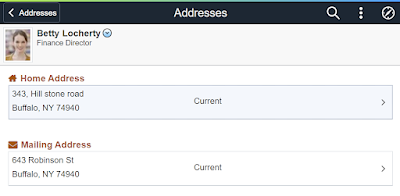
Without a Compare Report, how do you find isolated customizations? Do you need to find them? We have been discussing this lack of transparency since Event Mapping was released in PeopleTools 8.55. In fact, we've written SQL to help you locate code that includes Event Mapping that was touched by maintenance. But do we need to review every isolated customization? Here is an example. In 2016, I used Event Mapping to change the appearance of the Addresses Page. Notice the iconography next to the Home and Mailing Address in the following screenshot:


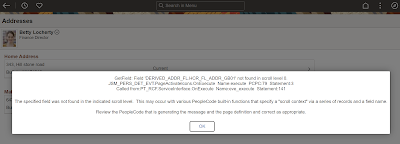
I haven't touched this isolated customization in 7 years. That is 7 years and possibly 21 "Get Currents" without a single care for this Isolated Customization! And then, I applied HCM PUM 46. Here is the result:

Event Mapping Failure


I've Waited 7 years for this to happen! Shouldn't a compare report have caught this? No. That is the point of an isolated customization. Our code is isolated from Oracle's code. Therefore, there is no Compare Report. But as you can see, sometimes our code still breaks after maintenance.

So what is the solution? How do we identify isolated customizations that broke while applying maintenance? Regression Tests. The solution to this challenge is the PTF Regression Test. Each time you create an Event Mapping, Drop Zone, or Page and Field Configurator solution, you should create a corresponding PTF regression test to prove your solution still works. A PTF Regression Test would have caught the error message and instantly failed the test. I would then analyze and retrofit just this one broken solution, not every single system change.

Compare Reports for Event Mapping, Drop Zones, and Page and Field Configurator? Do you really need them? Wouldn't a proper Regression Testing strategy save you hours, even days, of analysis by avoiding report reviews?

At JSMpros, we teach developers and business analysts how to create PTF Regression Tests through our two-day PeopleSoft Test Framework course. Find out when we are offering it next, or learn at your own pace through on-demand!

Thursday, August 03, 2023

"Technical Details" in Page and Field Configurator

I've had this challenge with Page and Field Configurator: 

Some components include the same field but on different records. When selecting fields, Page and Field Configurator shows the record and field, but when viewing the configuration grid, the record name is hidden.


But there is a new-ish feature in Page and Field Configurator: The Configure Field Properties grid now includes a Technical Details tab!


We can now see the record, field, page, and Occurs level for each field in the configuration! It seems simple but has such a huge impact! No more guessing!

Want to learn more about Page and Field Configurator? Sign up for our next Configure, Don't Customize class at jsmpros.com!


Tuesday, June 20, 2023

Enabling Search Framework Real Time Indexing (RTI)

As we prepare our HCM PUM 46 training servers, we decided to enable Real Time Indexing (RTI). We found several great sample videos and resources but still made a few mistakes. We are sharing our adventure to help you as you implement RTI.

Before implementing RTI, we have a couple prerequisites. First, we must have a working Elasticsearch (OpenSearch) service. Second, we should have some indexes deployed. Since our training focus is PeopleTools, we usually deploy the PTSF_RECENTMENU and the PTPORTALREGISTRY indexes. To summarize the prerequisites, we need a:

  • Working Elasticsearch (OpenSearch) installation and
  • Deployed indexes

Elasticsearch (OpenSearch) does not store its data in the PeopleSoft database. Instead, we move data into the Elasticsearch (OpenSearch) index storage through scheduled batch processes. The point of RTI is to reduce latency by eliminating scheduling; get data into indexes as fast as possible: Enter data → Search for data.

RTI works by using the following:

  • Triggers to insert rows into a staging table and
  • A Process Scheduler server process that checks for new rows in the staging table

Enabling RTI is a multi-step process requiring:

  • Process Scheduler-specific configurations and
  • Index-specific configurations

Process Scheduler Configuration

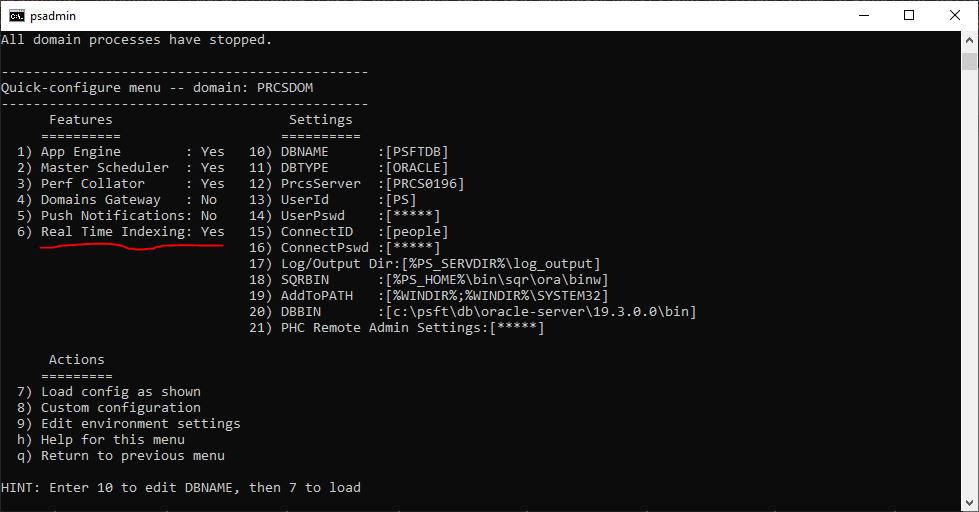
Let's start with the Process Scheduler Server. Using the psadmin command, make sure Real Time Indexing is enabled, as demonstrated in the following screenshot:

This turns on the "watcher" process. On interval, the PSRTISRV service polls the RTI staging table, PS_PTSF_RTISTG, for new rows to process. We can tune the number of RTI instances through the psprcs.cfg file.

[PSRTISRV]
;=========================================================================
; Settings for Real Time Indexing watchdog
;=========================================================================
;-------------------------------------------------------------------------
Min Instances=1
Max Instances=1

We may configure the polling interval through the Search Instance Search Options Config (PeopleTools > Search Framework > Administration > Define Search Instances). The last several options relate to RTI:


The Heartbeat Interval determines how often the RTI process checks for new rows in the RTI staging table (PS_PTSF_RTISTG). The Real Time Indexing Set Size specifies how many rows to process on each interval. The point is to tune these two numbers for optimal performance. The shorter the interval, the closer to real time, but with a performance cost. The longer the interval, the less the performance impact. Too long of an interval, however, and the number of transactions per interval may exceed the Set Size threshold, meaning RTI may only clear the queue after hours, creating a larger backlog with each run.

As a side note, PeopleSoft queues transactions for RTI through database triggers. A bulk update to a triggered table may generate more transactions than RTI can clear in a single polling interval, creating a latency effect for online transactions. Given the default configuration parameters, PeopleSoft will index 300 transactions every 2 seconds. If we batch update 30,000 rows of data, we may have to wait 4 minutes before that data clears the queue. 300,000 rows of data? Roughly 35 minutes. With this in mind, we may want to remove an index from RTI before a batch update, run the update, re-enable, and then schedule an incremental build to catch up. That way, intermittent, unusual batch processing doesn't interfere with online RTI processing.

Index Configuration

After configuring server settings, we choose which indexes to enable. Navigate to PeopleTools > Search Framework > Configure Realtime Indexing to select an index. To start with, pick indexes that are Disabled. These are indexes that contain RTI metadata, making them trivial to enable. Indexes marked as Not Configured may be enabled but will require additional configuration before enabling.


In our demo environments, we enabled PTSF_RECENTMENU. To enable an index:

  • Check the box Enable Real Time Indexing,
  • Save, and
  • Click the Trigger SQL link to download database-specific triggers.


When you click the Trigger SQL link, PeopleSoft will either open three new tabs or download three new files (it depends on browser configuration and registered handler for SQL files). The file name identifies the database: ora for Oracle, mss for Microsoft SQL Server, and db2 for DB2. If your browser opens them in new tabs instead of downloads, scroll to the end of the address bar to confirm the file name. This is where I made a mistake. I had so many open tabs that I didn't notice PeopleSoft opened three new ones. I only saw one and kept trying to run the DB2 script against my Oracle database.

Alternatively, as described by Ravi and Ramasimha in their Quest Recorded Webcast, we can let App Designer build the proper database triggers for us. I appreciate the App Designer integration because it ensures future record changes won't delete the RTI trigger scripts. It also means I don't have to log into a separate SQL tool or verify that I chose the correct database script.

After enabling RTI for an index, PeopleSoft recommends running a full or incremental sync to ensure all data exists in the target index. After that, you can cancel any scheduled run controls for that index, as RTI will now manage the incremental updates for that specific index.

Here are some great resources with additional information about RTI:

Is RTI Really "Real time"?

Realtime usually means data automatically flows from one system to the next. Create data → Send data. If RTI were truly real time, each update would send immediately. But if you have up to 300 updates within a 2-second period, a real time interface would create 300 connections to incrementally send 300 updates. PeopleSoft's near real time approach, however, is a lot like App Engine's Bulk Update. Another way to think of it is that RTI is a shuttle with room for 300 passengers. A shuttle arrives once every 2 seconds to pick up however many passengers are waiting. This is far more efficient than sending up to 300 vehicles individually. And even better, through parameters, we can tune the interval and passenger count to achieve the best experience for our users.

Which Indexes Should You Enable?

We recommend starting with PTSF_RECENTMENU. This allows the portal search feature to suggest user and enterprise recent items within search results. Next, we suggest enabling indexes used by component keyword search so your users may view transactions immediately after creation.


At JSMpros, we teach PeopleTools concepts every week. Each student who attends a live training class receives a properly sized, personal training server with relevant PeopleTools and application versions for the duration of training. This is one of the ways we provide you with an unparalleled training experience! Check out our website to see what we are offering next!

Access all of our content anytime from anywhere through our all-access subscriptions. Check it out!

Saturday, May 20, 2023

PeopleTools Learning Subscriptions

Are you looking to take your PeopleSoft Development skills to the next level? Look no further than our All-access Learning Membership.

With this membership, you'll gain access to a wealth of resources to help you improve your PeopleSoft Development knowledge and skills. From video tutorials to code samples and webinars, you'll have everything you need to become a PeopleSoft Development pro.

The membership also includes access to PeopleSoft experts, where you can ask questions and get feedback.

But what sets the All-access Learning Membership apart from other online learning platforms is its focus on real-world applications. You'll learn how to use PeopleTools to build practical, functional applications that you can use in your own projects.

And with new content added regularly, you'll always have something new to learn and explore.

So if you're ready to take your PeopleTools skills to the next level, sign up for the All-access Learning Membership at https://www.jsmpros.com/groups/all-access/. Your future self will thank you!