Monday, December 08, 2025

Branding System Options for Fluid

 The PeopleTools Branding System Options component allows a developer to inject custom CSS and custom JavaScript globally. This is fantastic, but it only applies to Classic/Classic+ (see Oracle Support document 2827970.1). Wouldn't it be nice to have the same functionality for Fluid? Now you can! PeopleTools 8.60 included Global Event Mapping, a feature that allows us to attach JavaScript and CSS to all Fluid components at once! We published a video a couple of years ago describing this PeopleTools feature. You may want to watch the video before continuing with this post:


Let's apply what we learned in the video to our scenario:

1. Create an Event Mapping Service App Class

In Application Designer, let's create a Global Event Mapping App Class. A Global Event Mapping App Class is just like any other Event Mapping App Class. They all start with the same PeopleCode. You may download our Event Mapping PeopleCode template from our GitHub repository. Here is a PeopleCode template to get you started:

import PT_RCF:ServiceInterface;

class FluidBrandingSystemOptions extends PT_RCF:ServiceInterface
   method execute();
end-class;

method execute
   /+ Extends/implements PT_RCF:ServiceInterface.execute +/
   
   If (IsFluidMode()) Then
      REM ** Insert JavaScripts;
      REM AddJavaScript(HTML.ABC123);
      
      REM ** Insert Stylesheets;
      REM AddStylesheet(Stylesheet.DEF456);
   End-If;
end-method;

2. Create an Event Mapping Service Definition

Every Event Mapping solution requires a Related Content Service Definition. As of PeopleTools 8.59, we can use a dedicated page for Event Mapping, but we don't have to. We can create our Global Event Mapping service definition the same way we have always created Related Content Service Definitions. Here is a screenshot of my service definition:


3. Run PeopleCode to Apply Global Event Mapping

Since there is no user interface to manage Global Event Mapping, we must invoke a few lines of PeopleCode to register our Global Event Mapping solution. I like to use App Engines for this, because I can run them directly from App Designer. Here is the PeopleCode I placed in my App Engine:

import PTCS_GLOBALEVENTMAPPING:*;

Local PTCS_GLOBALEVENTMAPPING:GlobalEventMapping &gem = create PTCS_GLOBALEVENTMAPPING:GlobalEventMapping();
Local boolean &bstatus = &gem.CreateGlobalEventMappingConfig("JSM_GBL_BRAND", "JSM_GBL_FL_BRAND");

4. Refactor Your Solution into a Table-Driven Framework (Optional)

Fantastic! We can now add or remove CSS and JavaScript globally by adding and removing lines from our App Class PeopleCode. Alternatively, would you like to maintain your list of assets through an online configuration page? The solution requires a bit more effort, but would involve the following:

  • A table to store JavaScript and Stylesheet names,
  • A page for configuring (likely with grids for JavaScript and Stylesheet assets), and
  • An online component.

I'll leave this final step to you. Personally, I prefer the static code listing, as it performs better (critical for Global Event Mapping), and my list of Stylesheet and JavaScript resources doesn't change very often. I also like the change control required by PeopleCode that would not exist if I had an online configuration table.

As noted in the video, be careful not to break Global Event Mapping. One misstep and your entire system is broken! As also noted in the video, correcting an error is trivial. Just comment out the offending code.


Are you interested in learning more about Event Mapping? Check out our Event Mapping on-demand course, just one of many on-demand classes included with our subscription service.

Tuesday, December 02, 2025

When AI Writes PeopleCode... Fact or Fiction?

I just asked Gemini the following question:

"Is there a PeopleCode variable to detect Fluid Mode vs Classic mode?"

Gemini responded with, "Yes!" I thought, "FANTASTIC!"

Here is the code snippet Gemini suggested:

If %Component.IsFluid Then
    /* Logic specific to Fluid Mode */
    MessageBox(0, "", 0, 0, "Running in Fluid Mode");
Else
    /* Logic specific to Classic Mode */
    MessageBox(0, "", 0, 0, "Running in Classic Mode");
End-If;

Wow! That is some fantastic PeopleCode! But AI is known to hallucinate. Before trusting this code, we have to ask: Fact or Fiction?

Let's start with line 1:

If %Component.IsFluid Then
It appears Gemini thinks %Component is an object. What does PeopleBooks say?
%Component returns an uppercase character string containing the name of the current component, as set in the component definition.
To confirm, let's try compiling it in Application Designer. The following is a screenshot of the compilation result:

Verdict: Fiction.

%Component contains a primitive string, not an object. Since a primitive string does not have methods. The IsFluid method would be invalid.

I followed up with Gemini by asking:

"Can you share your reference for %Component?"

Instead of sharing a bibliography of cited sources, Gemini shared what appeared to be very legitimate documentation that describes Gemini's understanding of %Component. I attached a screenshot for your reference:


I circled the last statement, because it was the only part of this listing that was true:

"Gemini can make mistakes, so double-check it"

But I have to ask: Where did Gemini get its information? 🤔 Like a crack reporter, Gemini would not reveal its sources.

The good news is that Gemini is a fast learner! I fed Gemini a few authoritative PeopleBooks, such as a reference to PeopleCode System Variables, and Gemini generated a new response. This version is clever, but does it work?

Local ContentReference &oCRef;
Local boolean &isFluidMode;

/* Get the ContentReference object for the currently running content.
This object holds the metadata for the component's setup.
*/
&oCRef = %Session.GetContentReference();

If (&oCRef <> Null) Then
    /* Check the IsFluid property on the ContentReference object */
    &isFluidMode = &oCRef.IsFluid;
End-If;

If &isFluidMode Then
    /* Execute PeopleCode specific to Fluid UI */
    /* ... */
Else
    /* Execute PeopleCode specific to Classic UI */
    /* ... */
End-If;

What do you think? Fact or Fiction?

Let's start with the first line:

Local ContentReference &oCRef;

Unfortunately, ContentReference is not a built-in PeopleCode data type. What about this line?

&oCRef = %Session.GetContentReference();

Strike 2! GetContentReference is not a documented method of the Session object.

Verdict: Fiction.

But Gemini is on to something! The Fluid Mode attribute is visible in Structure and Content, so with a bit of PortalRegistry PeopleCode and the new %CRef system variable, you could write a lot of PeopleCode to determine if the current component is using Fluid mode.

I wanted to spend a few more minutes helping Gemini find the correct answer, so I fed Gemini several more PeopleBooks entries, hoping it would derive the correct answer. Each time, Gemini gave me a new, seemingly authoritative but entirely fictitious response, inventing new App classes and creating new functions.

After a few iterations, I decided to share the correct answer with Gemini. PeopleCode has a built-in function to determine Classic from Fluid: IsFluidMode. Here is Gemini's reply:


"This built-in function provides the clean separation of logic needed when supporting the same component in both Fluid and Classic modes (emphasis added)..."

Should we tell Gemini that a single component cannot be both Fluid and Classic?

This was a fun exercise. It was like a PeopleCode puzzle: find the hidden AI hallucination, and solve the puzzle.

How about you? Do you have interesting stories about AI and PeopleSoft? If so, please share them in the comments. We love hearing your stories!

Today, there is no substitute for experience and a strong personal understanding of PeopleCode. Want to become a PeopleSoft development expert so you can better determine fact from fiction? Enroll in the JSMpros All-access training pass and start learning!

Thursday, October 23, 2025

PeopleSoft Reconnect 2025 | Dive Deep


The premiere PeopleSoft conference, Reconnect | Dive Deep, begins in just a few days. If you are not already registered for this live virtual conference, be sure to do so ASAP. If you are already registered, then be sure to log in to the conference app to build your agenda. Some sessions have capacity limits, and you don't want to miss them!

Here is the list of sessions I am presenting at this year's conference:

Monday

  • 4:45pm EDT P-051853, PeopleSoft Test Framework: More than Automated End-user Testing


Tuesday

  • 11:15 am EDT P-051448, Replacing Customizations with Configurations in Campus Solutions
  • 1:45 pm EDT P-051447, Enterprise Components: The "Other" Toolset
  • 4:15 pm EDT P-051446, PeopleSoft Fluid Best Practices


Wednesday

  • 12:30pm EDT P-051861, What's New in 8.62 for Campus Solutions!


Thursday

  • 12:30 pm EDT P-051442, Getting the Most out of PeopleSoft PeopleTools: Tips and Techniques
  • 1:45 pm EDT P-051445, Isolate and Configure: Don't Customize!

As a registered attendee, be sure to check out our virtual booth to watch replays from prior conference sessions. I look forward to seeing you online next week!

Monday, September 08, 2025

Parsing JSON Arrays with PeopleCode

PeopleCode includes built-in support for parsing JSON through a native object called the JsonParser. Let's review a couple of JSON strings and then see how the JsonParser interprets them. First, let's review a JsonObject:

{
  "course": "PT1",
  "description": "PeopleTools",
  "courseType": "T",
  "duration": 4
}

Assuming that the JSON text is in the string variable &jsonStr, then we might parse it with code similar to:

Local JsonParser &p = CreateJsonParser();

If (&p.Parse(&jsonStr)) Then
  REM ** Woo Hoo! It parsed!;
End-If;

Parsing means the JsonParser created an in-memory structure. To leverage the JSON, we need to access that in-memory structure. The JsonParser includes one documented method to access the JSON Structure: GetRootObject(). The GetRootObject method returns a JsonObject. According to the documentation, the following PeopleCode should give us the value of the description attribute from the JSON above:

Local JsonObject &course = &p.GetRootObject();
Local string &descr; = &course.GetString("description");

What about a JSON Array? Here is my concern: There is no GetRootArray method. What if the "root object" is not an "object," but an Array? Here is what a valid JSON Array might look like:

[{
  "course": "PT1",
  "description": "PeopleTools",
  "courseType": "T",
  "duration": 4
}, {
  "course": "PC",
  "description": "PeopleCode",
  "courseType": "T",
  "duration": 5
}]

We would parse it using the same code as above. But how would you access the Array? Since the Parser has a GetRootObject method, let's invoke it, and then ToString the root object to see its JSON output. Here is the PeopleCode:

MessageBox(0, "", 0, 0, "%1", &p.GetRootObject().ToString());

... and here is the JSON:

{[
    {
        "course": "PT1",
        "description": "PeopleTools",
        "courseType": "T",
        "duration": 4
    },
    {
        "course": "PC",
        "description": "PeopleCode",
        "courseType": "T",
        "duration": 5
    }
]}

Do you notice anything unusual about that JSON? Notice the extra curly braces ({}). The "root" object is a JSON object. But here is where it gets interesting. The printed JSON is not valid. An object must have an attribute. The array should be assigned to an attribute. Now, does this matter? I think Oracle is allowed to internally represent JSON any way they desire. You might say that what we did was unexpected. We asked PeopleSoft to print an internal representation, not a true, expected JSON Object. But my question is the same: How do you access the Array that is now inside the root object? Here is the answer:

&p.GetRootObject().GetJsonArray("");

The GetJsonArray method expects an attribute name. We don't have one. So we don't give it one. Just use a zero-length string.

Want hands-on experience with REST services and PeopleCode parsing techniques? Join us on Tuesday, September 23, for two hands-on, live virtual workshops focused on integration! Details for the entire September series are available online.

We teach PeopleTools tips like this every week. Check out our website to see what we are offering next. Prefer to learn at your own pace? Our entire catalog is available online.

Wednesday, August 13, 2025

Five Reasons to Adopt the Application Services Framework

PeopleSoft's Integration Broker has support for REST and JSON. But, it is clear from the metadata, design, and history that Integration Broker favors SOAP and XML (Web Services). Is there a better alternative? YES! As of PeopleTools 8.59, we have a module designed specifically for REST: the Application Services Framework (ASF).

Here are five reasons you should consider ASF for your next integration project:

1. URL Design

REST focuses on objects and data. In an enterprise system, business objects might be Employees, Students, or Vouchers. In ASF, we might call these root resources. Continuing with the Voucher example, we might have the following URLs:

  • .../ap/vouchers
  • .../ap/vouchers/000000012567

When constructing an Application Service, we would have the "ap" service, which would then have a "vouchers" root resource. We could then define URI templates for:

  • vouchers (get a list of all vouchers)
  • vouchers/000000012567 (get a specific voucher)

We would further define HTTP methods, such as GET, PUT, PATCH, or POST, to fetch, update, or create business objects within the respective collections.

The Application Services framework helps us design URLs by first thinking about the module → then the collection → and then the specific object (generic to specific).

When we browse the Internet, we expect to find an organized collection of documents (endpoints) conveniently filed in meaningful folders. Computers browse the Internet, and those computers should expect an organized collection of business "documents" as well.

2. 201 Created Success Status Code

Web Services and SOAP use a protocol within a protocol. The typical Web Service request uses HTTP as the transport protocol and SOAP for the transaction protocol. Therefore, a Web Service might return a 200 HTTP status code to report success even though the SOAP transaction failed.

REST HTTP status codes have meaning. HTTP status codes in the 200 range represent successful responses. The most important HTTP status codes for a PeopleSoft developer are 200, 201, 202, and 204. These are the ONLY HTTP success status codes supported by ASF. Integration Broker REST-based Service Operations, on the other hand, support several other 200-level status codes, but with one critical omission: REST-based Service Operations do not support 201. 201 is the status code for "created." Assuming a PUT or a POST, the proper response may be a 201 - Created. This is critical. If the service handler immediately creates a transaction, then it should return a 201. The Application Services Framework supports this, but traditional REST Service Operations do not.

3. 401 Unauthorized Bad Request Status Code

PeopleSoft takes control of the HTTP Authorization header for several reasons. Here are a couple:

  • To determine if the requester is authorized to access the requested service.
  • To assume the identity of the user making the request, allowing PeopleCode to run as the proper user.

If PeopleSoft determines the requester does not have access (based on roles and permission lists), then PeopleSoft will return the 401 Unauthorized HTTP status code. This happens at the Integration Broker level, and it is fantastic!

But what if your business logic needs to return a 401 Unauthorized? Traditional REST-based Service Operations do not allow this.

Consider the following example. Let's say that a user is authorized for our /ap/vouchers service (the example above). That user might be authorized to access certain vouchers, such as .../ap/vouchers/000000012567, but not .../ap/vouchers/000000012568. This is called row-level security. In this scenario, we should return a 401 - Unauthorized. The user is authorized for the service, but not the data.

Traditional REST-based Service Operations do not allow you to return a 401 Unauthorized EVER. ASF does. 401 is an acceptable failure response from an Application Service.

4. OpenAPI

Metaphorically speaking, OpenAPI is the WSDL of REST. ASF generates OpenAPI specifications for us. We can plug these OpenAPI URLs or downloaded descriptors into various consumers, including Oracle Digital Assistant, Oracle Integration Cloud, Oracle Visual Builder, and more!

5. PeopleCode

ASF was designed to expose Application Classes as REST services. The framework includes an API designed to construct single-row and multi-row responses. The API was designed for REST with support for HTTP status codes and HTTP methods.

6. (Bonus) Metadata Design

ASF metadata consists of:

  • Module
  • Root Resource
  • URI Templates
  • Parameters
  • Result States
  • HTTP Headers
All of these are common and expected REST metadata concepts. Traditional REST Service Operations, on the other hand, include Messages, Services, Service Operations, and Documents; metadata structures that are more appropriate for Web Services than REST.


What to learn more? Create a free account at jsmpros.com and explore our free webinar replays to learn the basics of the Application Services Framework. Next, join us for our three-day live virtual Integration Tools Update course. Prefer to learn at your own pace? This same material is available on demand! Watch the videos whenever and wherever you like, and then complete the hands-on activities on your own server.

Wednesday, July 23, 2025

PTF: Recorder is unable to load... Now What?

I love PTF! With Selective Adoption, Continuous Delivery, and Customization Isolation strategies, PTF is more important than ever. Since Event Mapping, Drop Zones, and Page and Field Configurator don't appear on compare reports (and that is the point), we need a tool like PTF to expose regressions we would have found through the traditional retrofit analysis. The traditional retrofit approach required us to analyze and retrofit every customization. Event Mapping, Drop Zones, and Page and Field Configurator free us to focus on just what broke during the upgrade. And this is why PTF exists. The PTF regression test is how we find what broke. PTF is the linchpin that holds the whole isolated customization strategy together. Without it, we either go live with undiscovered errors or we continue to analyze and retrofit everything.

But what if you launch the PTF recorder and suddenly see this?


What happened? The PTF recorder is a Chrome/Edge plugin. That plugin needs to be loaded for the recorder to function. The PTF application attempts to install this plugin each time it launches the recorder. Depending on your enterprise settings, however, Chrome may deny that request. This is what happened to me. Enterprise customers have been dealing with this since PeopleSoft switched to the Chrome recorder. However, this is what surprised me: I'm simply using a standard Chrome download on an unmanaged server. In fact, PTF used to work just fine on this very server, and this behavior is a recent development. Perhaps Chrome altered its security policy?

Fortunately, this is a known and documented issue. Enterprise customers with highly controlled Chrome environments have been experiencing this issue since PTF switched to the Chrome recorder. Take a look at MOS Doc ID 2922127.1. This document outlines the steps necessary to correct the issue. Following those steps, I launched Chrome as an Administrator by:

  1. Typing Chrome into the Windows Menu and
  2. Right-clicking the Google Chrome entry and choosing Run as Administrator from the popup menu

I then navigated to chrome://extensions/ and turned on Developer Mode:


Finally, I dragged the Chrome extension psTstRecCh.crx file onto the Chrome extension window:


But after a restart, it still didn't work. I could now see the extension listed in Chrome, but it was disabled, and no matter how many times I clicked, it wouldn't enable itself!


Even though the extension was installed, Chrome wouldn't trust it. Even as an Administrator, I could not enable the extension. The final step is to override Chrome's behavior by encouraging it to trust Oracle's PTF extension. We do this through the Windows Registry. The appropriate Windows Registry keys are listed in PeopleBooks under Installing a PTF Client > Configuring Browser Settings. Here is the contents of my *.reg file I imported into my Windows Registry.

Windows Registry Editor Version 5.00

[HKEY_LOCAL_MACHINE\SOFTWARE\Policies\Google\Chrome]

[HKEY_LOCAL_MACHINE\SOFTWARE\Policies\Google\Chrome\ExtensionAllowedTypes]
"1"="extension"

[HKEY_LOCAL_MACHINE\SOFTWARE\Policies\Google\Chrome\ExtensionInstallAllowlist]
"1"="boainbfkaibcfobfdncejkcbmfcckljh"

[HKEY_LOCAL_MACHINE\SOFTWARE\Policies\Google\Chrome\ExtensionInstallBlocklist]
"1"="*"

Please note that editing the Windows registry can be risky and potentially cause serious problems, including system instability or even rendering Windows unbootable. Therefore, it's crucial to proceed with extreme caution and only if you are confident in your actions. Always back up the registry before making any changes, and keep detailed records of modifications.

And that was all it took! My PTF recorder is now working as well as ever!

At JSMpros, we teach PeopleSoft tips like this every week. Check out our schedule to see what we are offering next! Have a large group you would like to train? Contact us for scheduling and group pricing.

Monday, June 02, 2025

Have you Considered the Application Services Framework?

 We recently asked the PeopleSoft LinkedIn Community:

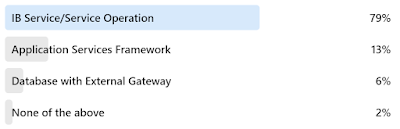
Which would you choose to expose a PeopleSoft REST endpoint?

Here were the responses:


The answers surprised me. On the one hand, the IB Service/Service Operation approach was the only option until PeopleTools 8.59. This makes it familiar. However, the Application Services Framework was specifically created for REST. Unlike traditional IB Services and Service Operations, which were designed for SOAP and Web Services, the Application Services Framework focuses on HTTP concepts, such as URL design, status codes, data structures, and more. Here are some benefits the Application Services Framework offers over traditional IB Service Operations:

  • Generates an OpenAPI specification for import by consumer applications.
  • Provides additional HTTP status codes.
  • Uses a PeopleCode API that aligns more closely with REST service design.
  • Eliminates irrelevant metadata creation, such as Message Definitions and Documents.

The Application Services Framework is a REST-specific, REST-focused layer over the top of service-oriented Integration Broker metadata. If you haven't done so already, we recommend reviewing the Application Services Framework. It definitely simplifies REST Service development.

The Application Services Framework is part of our standard Integration Tools training. Join us for our next class to learn more! Already a subscriber? Log in and Get Started!

Tuesday, May 27, 2025

Blueprint 2025


Education sessions at the premier PeopleSoft conference, Blueprint 4D, officially begin in two weeks! Join us in Las Vegas to learn from Oracle product strategy, strategic partners, and Oracle's customers.

The mobile app and agenda are now live. I am presenting the following three fantastic, fun-filled, and educational sessions!

  • Cloud Integration Strategies on Tuesday, June 10 at 5 PM
  • Getting the Most out of PeopleSoft PeopleTools: Tips and Techniques on Wednesday, June 11 at 9:00 AM
  • PeopleSoft Fluid Best Practices on Thursday, June 12 at 3:00 pm.

When we are not in sessions, you can find us in the exhibition hall.

See you there!

Tuesday, May 06, 2025

Which Technology Would You Use for JSON?

We asked our LinkedIn audience:

Which Technology Would You Use to Process JSON?

And they replied:


These answers are fantastic! Based on performance testing and research, PeopleCode native JSON objects, such as JsonObject and JsonArray, perform much faster than the Documents module or external Java libraries. However, there are times when I might choose an alternative.

Java Libraries

PeopleCode leverages the Java Native Interface to provide bidirectional access to Java. Java classes can interact with PeopleCode functions and objects, and vice versa. In addition to the delivered Java API, PeopleSoft provides several key Java libraries, including the Jakarta JSON library. Jakarta stream processing enables us to process enormous datasets. This stands in contrast to native DOM-based JSON parsing, which is limited by the amount of system memory available.

Documents

A document structure may generate either XML or JSON, which might simplify solution development when creating APIs that support multiple output types. Likewise, a document structure is required when creating a REST URI template.

Additional Resources


How about you? What technology would you choose? What are some reasons you might choose an alternative to the native JsonObject and JsonArray?

At JSMpros, we teach JSON processing techniques regularly through our Integration Tools Update course. Check out our online schedule to see what we are offering next! Alternatively, subscribe to gain access to all of our on-demand courses!

Monday, April 21, 2025

Consuming Enormous Datasets with PeopleSoft

Integration Broker is built on the DOM concept, which means it parses data into an in-memory structured document before transforming, processing, or transmitting it. This is fantastic for small and incremental integrations designed to keep two systems synchronized on a per-transaction basis. However, it fails when processing datasets that exceed the amount of available system memory.

An alternative is to use a SAX or stream-based parser that emits events. This type of parser only consumes the memory necessary to emit the next event. Stream-based parsers are highly efficient for one-way, one-time reads through large datasets. Unfortunately, Integration Broker does not support stream-based processing.

While reviewing PeopleSoft's Java class path, I noticed the Jakarta JSON stream-processing Java library. You can find a simple PeopleCode example of processing a JSON file using Jakarta JSON streams in our blog post JSON Stream Processing with PeopleCode. Now that we know how to use Jakarta's stream processing, the next challenge is reading an input stream from an external service. Since Integration Broker does not support streams, we need alternatives. Here are a few Java-based alternatives that readily integrate with PeopleCode through delivered APIs:

  • Java Sockets
  • Java HttpURLConnection
  • Apache HttpClient

Although PeopleCode offers incredible support for Java, the real challenge lies with method and constructor overloading. PeopleCode identifies target Java methods and constructors through parameter count, not parameter type. Java overloading doesn't play well with PeopleCode. The solution I use to overcome method overloading is to leverage Java's support for JavaScript as a translation layer or a "glue." PeopleSoft exposes all functions and objects to Java. Therefore, all PeopleCode functions and objects are also available to JavaScript.

The following is a sample JavaScript that can run from PeopleCode to stream load data into a PeopleSoft table. It uses Jakarta for stream processing and Apache HttpClient to connect to the external service. Both of these external libraries are included with PeopleTools. Notice the use of PeopleCode functions, such as CreateSQL, as well as Java objects such as HttpGet.

I use PeopleCode similar to the following to run JavaScript from PeopleCode. You can find several examples of using Java's ScriptEngineManager on our blog.

Local JavaObject &manager = CreateJavaObject("javax.script.ScriptEngineManager");
Local JavaObject &engine = &manager.getEngineByName("JavaScript");
Local String &script = "JavaScript goes here";
Local Any &result;

&engine.eval(&script);

&result = &engine.get("result");

At JSMpros, we teach PeopleTools and PeopleCode tips like this in every class. Check out our online schedule to see what we're offering next. Would you prefer to learn at your own pace? Purchase a subscription to access all of our on-demand content at discounted rates!

Wednesday, February 26, 2025

Function Library or Application Class?

When we discover redundancies while writing code, the DRY principle (Don't Repeat Yourself) encourages us to refactor our code into reusable definitions. Reasons cited for writing DRY code include:

  • Code that is easier to maintain,
  • Code that scales better as system load increases, and
  • Reduced redundancies in process logic.

With PeopleCode, we have two reusable options:

  • Function Libraries
  • Application Classes

We asked our LinkedIn audience which option they would choose.


The poll results show that 76% would choose Application Classes! Wow! 76% will defer to Object-oriented programming. This is one of those questions that has no right or wrong answer. Both are effective. But is there a more correct answer? Is there a time when using one over the other is more appropriate?

Let's consider App Classes first. Every App Class involves object creation overhead, which means using objects has a cost. But there are two features App Classes contain that set them apart from Function Libraries:

  • State: App Classes have an internal state. App Classes have private, internal variables that persist beyond method invocation.
  • Dynamic Execution: At runtime, we can create objects, set properties, and invoke methods that didn't exist during design time. Function libraries can't do this.

If I know that my solution will require internal state or dynamic execution, I choose App Classes; function libraries are not an option.

Here are a few other reasons people choose Application Classes over Function Libraries:

  • To leverage dynamic testing frameworks such as PSUnit.
  • Extensible framework development through inheritance and composition.

Is there a place for function libraries in modern PeopleCode? This is an interesting question that I think Oracle answers for us. If you look through Oracle's Fluid-specific PeopleCode, you will see a lot of references to Fluid-specific Function Libraries. Why? If you don't need internal state or dynamic execution, then a Function Library may be the fastest, lightweight option.

Consider the following example (adapted from Base64 Encoding with Emoji):

/****
 * You may find a subset of supported character sets in the Javadoc:
 * https://docs.oracle.com/javase/8/docs/api/java/nio/charset/Charset.html
 */
Function base64_encode(&textToEncode as string, &charSet as string) returns string
   Local JavaObject &encoder = GetJavaClass("java.util.Base64").getEncoder();
   Local JavaObject &bytes = CreateJavaObject("java.lang.String", &textToEncode).getBytes(&charSet);

   return &encoder.encodeToString(&bytes);
End-Function;

Does it make more sense to expose this reusable algorithm as a Function Library or Application Class method? What do you think? If you choose App Classes, why? If you prefer Function Libraries, we would love to hear your reasons!

At JSMpros, we teach PeopleTools and PeopleCode tips like this in every class. Check out our online schedule to see what we're offering next. Would you prefer to learn at your own pace? Purchase a subscription to access all of our on-demand content at discounted rates!

Tuesday, February 25, 2025

HEUG Alliance 2025!


The HEUG Alliance 2025 conference is just over a week away, and I can’t wait! My travel is booked, my bags are packed, and I've added sessions to my agenda through the Alliance Conference App!

I will be presenting the following sessions:
  1. Getting the Most out of PeopleSoft PeopleTools: Tips and Techniques
    - Date: Monday, March 10, 2025
    - Time: 1:30 PM
    - Location: Room 265

  2. PeopleTools Integration Strategies
    - Date: Tuesday, March 11, 2025
    - Time: 9:45 AM
    - Location: Room 265  
I look forward to seeing you there!

Tuesday, February 04, 2025

Page and Field Configurator or Event Mapping?

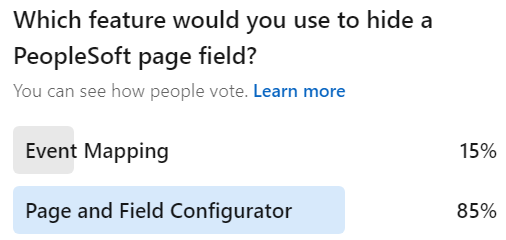
Which tool would you use if someone asked you to hide a PeopleSoft field? We asked our LinkedIn audience that same question. Here are the results:


85% of respondents chose Page and Field Configurator, which is fantastic!

Both tools can hide a field, but is one a better option? I use a decision matrix to help me decide which one to use:

Decision Matrix

Event Mapping PaFC
Can the solution be configured with PaFC?
PaFC cannot provide the expected result.

If you can use Page and Field Configurator, then choose it for these two reasons:

  • Page and Field Configurator contains a "Validate Configuration" feature to verify the configuration is still relevant after applying maintenance and
  • Functional business analysts may manage Page and Field Configurator (Event Mapping is a developer-only solution).

When should you use Event Mapping? For everything else. For example, Page and Field Configurator does not yet work with Group Boxes. Likewise, complex logic may require Event Mapping (or might be easier to read and write if written in Event Mapping).

We teach both topics in our three-day Configure, don't Customize course. Check it out to see when we are offering it next!

Tuesday, January 07, 2025

Five Ways to Consume a REST Service with PeopleSoft

PeopleSoft includes facilities for providing and consuming REST. A service provider is a listener. A provider waits for requests and responds accordingly. To provide web services, we must register metadata with Integration Broker. The process is pretty well fixed. Consumption, on the other hand, is much more flexible. Consuming a REST service means invoking (or calling) someone else's listener. The consumer initiates the conversation. In a consumption scenario, we might be sending data, receiving data, or both.

Here are five ways a PeopleSoft developer might invoke a REST service:

1. Metadata

This is the traditional PeopleSoft approach and follows the same pattern as providing services through Integration Broker. Here are a few of the metadata items a developer would create:

  • Documents,
  • Messages,
  • Service, and
  • Service Operation.
After creating and registering somewhat reusable metadata, the developer would then write PeopleCode to:
  • Create Document structures,
  • Invoke the service, and
  • Parse the response.

Even though this approach requires the most effort and offers the least reuse, it takes full advantage of Integration Broker's capabilities, including logging, security, etc.

Metadata, in general, offers the following benefits:

  • Reuse (ability to use the same definition multiple times),
  • Documentation (describes an object),
  • Reporting (query and analysis), and
  • Transformation (ability to upgrade and transform based on architecture changes).

Pure code solutions are much harder to query and transform. Metadata is what allowed PeopleSoft to switch from a Windows-based Client/Server solution to its Pure Internet Architecture in (mostly) one release. Metadata is what allowed Integration Broker to transform from an XML-focused solution into an SOA solution in one release (the 8.48 transform). If these benefits sound appealing, then metadata may be the right choice for you.

2. Application Services Framework

Created initially as a REST provider to support digital assistants, the Application Services Framework can now consume REST services. The Application Services Framework is a developer-friendly configuration layer tightly integrated with Integration Broker metadata. Rather than directly working with SOA-oriented metadata, the Application Services Framework allows developers to create solutions using REST terminology and REST patterns.

To use the Application Services Framework for consumption, a developer would:

  • Register the target service with the Application Services Framework, which includes describing the URL, parameters, headers, and payload (both request and response).
  • Write PeopleCode to invoke the endpoint service.
This is one of the most important chapters in our updated Integration Tools curriculum. You may find basic information (including code samples) on consuming a REST service in PeopleBooks.

3. %IntBroker.ConnectorRequestURL

If your request is a simple URL with no special headers (request or response headers) and any parameters may be passed through the URL, then this is the most straightforward approach:

Local string &response = %IntBroker.ConnectorRequestURL("http://rest.example.com/endpoint");

Unfortunately, this solution offers no logging, header control, or any typical Integration Broker or integration features. It is strictly for the simplest GET requests. Nevertheless, by using URL definitions, this alternative may be one of the better alternatives for cross-environment migrations.

4. Code-only

The challenge with the first option, Metadata, is that it requires creating, migrating, and maintaining a significant number of definitions that provide little (if any) value for REST. For example, the URL of a PeopleSoft REST consumer service becomes part of the metadata. If you have different targets between DEV, TEST, and PROD, then you must modify the metadata after every migration. Implementing a true PeopleSoft Metadata-focused solution (such as option 1) may require you to violate development best practices by making changes after each migration.

Since all approaches require PeopleCode, why not skip the Integration Broker metadata in favor of your own reusable best practice-based metadata? You may find an example of this approach in our blog post Simple Code-only REST Request. With this approach, you are responsible for managing URLs, Credentials, etc., but you may store them in a manner that allows for reuse and better migration management. For example, you might create URL definitions that point to different endpoints in DEV, TEST, and PROD.

It is important to note that this approach DOES use metadata, but it reuses generic PeopleTools-delivered definitions, so we don't have to create new definitions.

As mentioned earlier, code doesn't report or transform well, so this alternative may miss out on future automated transforms, such as the 8.48 automated transform. Likewise, integrations launched in this manner won't log details in the Synchronous Service Operation Monitor. Nevertheless, this approach is becoming one of our favorite alternatives to overly complicated metadata.

5. Java

Using Java allows a PeopleSoft developer to bypass Integration Broker altogether. We put this option last because it should be the choice of last resort. However, it is probably the most flexible option available, allowing for everything from simple low-level sockets to convenient libraries, such as Apache's HttpClient (now included with PeopleTools).

There are many reasons to choose this option, but here are the two most common:

  • Processing binary data: Integration Broker is pretty much an XML workhorse. Everything passing through Integration Broker is wrapped in XML at some point. Unfortunately, that might not work well with binary data. Therefore, skipping Integration Broker may be appropriate.
  • Processing large amounts of data: Integration Broker works with DOM. It requires all data to be loaded in memory at one time. This makes it a poor choice for handling large datasets. An alternative is to use stream processing with an event-based parser, such as a SAX parser. With Java, you can read bytes, process them through an event-based processor, and then discard the processed bytes.
The challenge with using Java directly from PeopleCode is that many Java methods and constructors use overloading. As a workaround, we devised a strategy for invoking Java through JavaScript from PeopleCode. With a small PeopleCode fragment, we can invoke a JavaScript, and JavaScript handles Java really well. Details about this strategy are available in our Blog Post JavaScript on the App Server: Scripting PeopleCode.

The following is a sample JavaScript we used at Reconnect 2024 to stream-processed a large amount of JSON data from a REST service.


At JSMpros, we teach all five options in our Integration Tools and Integration Tools Update courses. Check out our website for on-demand and live course offerings. Alternatively, subscribe to gain access to all of our on-demand courses.

Thursday, December 19, 2024

How Well Do You Know the PeopleCode Language?

 I was reading through some forum threads and saw an interesting question. Let me summarize:

How do I convert from a number to a string so that I get the integer portion of the number? I have 1234 in a number, but when I put it in a string field, I get 1234.00.

This is a great question! There are many PeopleCode "casting" functions, such as Number and String. Reading through the thread, I saw some interesting answers. One of them that I liked used Java to do the conversion. What I liked about this idea was the out-of-the-box thinking. But is it necessary? Can you do this with PeopleCode? The answer is YES using the functions NumberToString and NumberToDisplayString. Is there anything wrong with using Java instead? No. I love PeopleCode's ability to leverage the JRE. But there is a cost in context switching, JRE overhead, etc.

Keeping with the number and string scenario, do you really need to "cast" a number to a string? Consider the following code listing:

Local number &anInteger = 1234;

MessageBox(0,"",0,0, &anInteger);

This code would fail because the fifth parameter to MessageBox must be a string. Therefore, it seems we need casting functions. Or do we? Consider the following alternative (notice the string concatenation in the MessageBox function):

Local number &anInteger = 1234;

MessageBox(0,"",0,0, "" | &anInteger);

When we concatenate a number to a string, PeopleCode applies an implicit cast. Interestingly, it only applies an implicit cast if we trick it with a zero-length string. As a side note, the above implicit cast returns the integer portion 1234 without decimals because 1234 has no decimals (which was the original request).

What about conditional logic? Here is one of my favorite examples:

If(PER_ORG_ASGN.POI_TYPE = "00002") Then
   JOB.COMPRATE.Visible = False;
Else
   JOB.COMPRATE.Visible = True;
End-If;

The above conditional code could be rewritten as:

JOB.COMPRATE.Visible = (PER_ORG_ASGN.POI_TYPE = "00002");

With an understanding of the PeopleCode language, we have reduced five lines of code into a single line. This might be considered the Spartan Programming approach. While I love the concept, Spartan Programming claims it "is not directly concerned with readability." Therefore, I prefer a slightly modified, possibly more human-readable alternative:

Local boolean &isVisible = (PER_ORG_ASGN.POI_TYPE = "00002");

JOB.COMPRATE.Visible = &isVisible;

Here is another piece of code I found several years ago:

Local Array of String &arr;

...

REM ** delete all elements from an array;
For &i = 1 to &arr.Len
   &arr.pop();
End-For;

If you look through PeopleBooks, you will see the Array has no clearemptydeleteAll, or any other method for emptying all elements from an array. So I can see why the author wrote the code above. But the reason the Array object has no method for emptying an array is because it doesn't need one. The Array length is writable. The easiest way to empty an array is:

&arr.Len = 0;

How well do you know the PeopleCode language? Time for a refresher? Check out our on-demand PeopleCode course and advanced PeopleCode Application Classes courses and experience a new side of PeopleCode!

Tuesday, November 19, 2024

Generating Activity Guide URLs

Creating Activity Guide navigation is challenging for two reasons:

  1. Simple Fluid Activity Guides all use the same component. This means we can't use a simple content reference. To use security to show or hide an Activity Guide content reference, we must use the URL type of PeopleSoft Generic URL. We must type a PeopleSoft URL fragment rather than leverage the traditional Content Reference fields (menu, component, market).
  2. Activity Guides with Runtime Context require dynamically generated URLs. These Activity Guides cannot leverage simple content references.

My PeopleCode for launching Activity Guides with Runtime Context usually starts with a GenerateComponentPortalURL to generate the base Activity Guide framework URL and then a bit of URL concatenation to assemble the Runtime context attributes. Here is an App Class I put together to make this easier.


Here is how you would use it:

import JSM_URL_UTIL:ActivityGuideURL;   
   
Local JSM_URL_UTIL:ActivityGuideURL &urlBuilder = create JSM_URL_UTIL:ActivityGuideURL("JSM_AWE_AG");
Local string &url;

&urlBuilder.addContextItem(Field.EOAWPRCS_ID, "FacilityAccessRequest");
&urlBuilder.addContextItem(Field.DESCR, "Facility Access Request");

&url = &urlBuilder.generateFluidURL();

The addContextItem method takes a key/value pair, both of which are strings (they will become part of the URL string). Since context IDs (keys) are fields, then using Field.FIELDNAME syntax is preferred so Edit | Find Definition References will locate your field usage.

We added one more convenience method: generateGenericPeopleSoftFluidURL(). Use this method to help you craft a PeopleSoft Generic URL to a static Activity Guide. This is a one-time-use method you would call at design time to create that static URL fragment required by a Content Reference. If you have a simple, static Activity Guide with no context, then you may want to create a Content Reference. However, typing all of the parameters correctly can be a challenge. Use this helper method to generate the full Generic PeopleSoft URL for you. We invoke this method from a design-time App Engine, but you may want to create a page for it instead.

Are you interested in learning more about PeopleCode Application Classes? Check out our two-day course available live virtual or on-demand!

Tuesday, October 22, 2024

PeopleSoft Reconnect 2024


I have the privilege of sharing the following sessions at PeopleSoft Reconnect 2024:

  • Getting the Most out of PeopleSoft PeopleTools: Tips and Techniques on Monday at 4:45 PM Eastern. During this session, I will share PeopleTools tips to help you become a more productive PeopleSoft developer, including ways to use Java, JavaScript, and Integration to build solutions without customizing Oracle's code. Functional staff and business analysts will benefit from experiencing what is possible with the PeopleSoft platform.
  • Isolate and Configure: Don't Customize on Tuesday at 12:00 PM Eastern. With selective adoption and continuous delivery, it is important that we avoid customizing PeopleSoft. The more we customize, the less we adopt new features and apply maintenance. Join this session to understand options to help us isolate and replace customizations. Experience the art of the possible through incredible examples and use cases.
  • PeopleSoft Test Framework: Your New Compare Report on Wednesday at 3:45 PM Eastern. Event Mapping, Drop Zones, and Page and Field Configurator allow us to isolate (not eliminate) customizations. A key difference between traditional and isolated customizations is that traditional customizations are listed in a compare report. Isolated customizations are not. However, isolated customizations run the same risk of breaking as traditional customizations. Join me on Wednesday to learn how we can use the PeopleSoft Test Framework to replace the compare report, allowing us to analyze broken customizations rather than the traditional approach of analyzing everything.
  • PeopleSoft Fluid Best Practices on Thursday at 1:15 PM Eastern. Fluid is PeopleSoft's strategic direction. But how does it differ from Classic? In this session, I will share with you tips and design patterns to help you build better Fluid solutions faster. Tips will include grid handling, adaptive and responsive design, CSS, and CSS variables.
I look forward to seeing the PeopleSoft community online virtually next week, October 28-31!

Thursday, October 03, 2024

Finding Tiles

Fluid Homepage Tiles are Content References just like all other content references, with one exception: They are really hard to find! Fluid tile definitions exist in a subfolder of Fluid Structure and Content > Fluid Pages. The question is: Which folder?

PeopleTools 8.60 added a new feature that may help: groupletid. Tile HTML now contains a custom attribute called groupletid. You may read more about this new feature in PeopleSoft PeopleTools 8.60 New Features Overview (Doc ID 2897533.1) on My Oracle Support.

As stated in the support document, the Grouplet ID is the Content Reference ID (CREF ID). Fantastic! What that means is you and I can capture the CREF ID directly from the HTML!

Once I have the CREF ID, I can visit Enterprise Components > Find Object Navigation to find the tile's Portal Registry folder and path.

Are you interested in printing a list of all tile CREFs for a particular user? Fire up your browser's JavaScript console and type (or paste) the following:

document.querySelectorAll("div[groupletid]").forEach(function(el) {
  console.log(el.getAttribute('groupletid'))
});

All tiles from all homepages exist in the HTML as soon as the homepage loads. They are just hidden. Want to just see the tiles for the active homepage? Try this derivative:

document.querySelectorAll(".lptab-cont:not(.psc_invisible) div[groupletid]").forEach(function(el) {
  console.log(el.getAttribute('groupletid'))
});


At JSMpros, we teach PeopleTools tips like this every week! Check out our class schedule to see what we are offering next. Want to learn on your own time? Become a subscriber to access all our courses anytime from anywhere!

Tuesday, August 13, 2024

Should you use the Override and/or Replace Features?

I absolutely love Isolated Customization strategies such as Event Mapping and App Engine Action Plugins. These strategies allow us to extend Oracle's delivered solution without touching Oracle-delivered code. The benefit is more efficient maintenance cycles because of fewer retrofits.

Both of these features, Event Mapping and App Engine Action Plugins, have one shortcoming: You may not use them to inject code into the middle of an Oracle-delivered code listing. Event Mapping and App Engine Action Plugins only allow code to be inserted before or after an entire listing. What if you need to inject code in the middle? Until recently, the only option was to continue modifying Oracle's delivered code.

Both Event Mapping and App Engine Action Plugins have a feature allowing a developer to replace or override Oracle's delivered code listing with your own. Customers looking for "clean" compare reports may be tempted to copy the Oracle-delivered code into their own code listing, modify it, and then replace/override Oracle's delivered code. The end result is a clean compare report and hopefully less work when applying maintenance.

But does it really work that way? Let's say you take this approach. You clone Oracle's delivered code into your own code listing. You modify your copy. You use Event Mapping or App Engine Action Plugins to replace Oracle's code. Time passes, and you apply maintenance. Since the compare reports show no customizations, you adopt Oracle's changes with no retrofits. You test the system, and because of your overrides, the system continues using your code, not Oracle's code. This is good, right? Isn't this what you want? MAYBE NOT! Oracle delivered maintenance for a reason. Did they patch a security vulnerability? Did they fix a bug? Did they alter the data model or business logic in a manner that renders your clone less effective?

If you use the override/replace in this manner, you have no way of knowing what Oracle "fixed." The only way to know that you are using the latest version of their code is to perform your own manual compare and retrofit outside of PeopleTools. And if you are going to do that, wouldn't it be easier to just modify Oracle-delivered anyway? You know what is worse? Since overridden and replaced code listings don't show on compare reports, your system may be fully patched and still suffer security vulnerabilities in your clones of Oracle-delivered code.

The Override/Replace features are fantastic for REPLACING Oracle's delivered code. In other words, if you don't want Oracle's code to run at all, then override or replace it.

Want to learn more about PeopleTools Event Mapping? Check out our one-day on-demand Event Mapping course! Or even better, subscribe and get a full year of access to the entire JSMpros on-demand PeopleTools training library!

Want to further reduce your maintenance workload? Replace customization analysis and review with PeopleSoft's Automated Testing Tool (PTF). Learn how through our two-day PTF course, which is available on-demand and live!

Thursday, June 27, 2024

PeopleSoft Data Masking Options

PeopleSoft customers have several Data Masking options:

Let's compare the various options.

Event Mapping

Event Mapping is the most flexible option, allowing us to use any masking character, from alpha-numeric to emoji. In fact, you may even combine the space character with custom CSS to leverage any character, including custom Fonts, such as FontAwesome. Relevant PeopleCode functions and methods include:

Field.SetDisplayMask
Field.AddFFClass
AddStylesheet

Check out this video to learn more about Event Mapping for Data Masking:


Page and Field Configurator

Page and Field Configurator is less flexible but easier to apply than Event Mapping. Page and Field Configurator offers a point-click interface to configure masking against page fields. Masking characters are limited to * and x (although this is configurable through masking profiles).

App-specific masking

The HCM team built its own registry of sensitive fields with a masking utility. You can learn more about this feature in the Quest blog post Maintaining Data Privacy in PeopleSoft HCM. What makes this option compelling is:

  1. The HCM team wrote all the code. All we have to do is choose our sensitive fields, components, and roles.
  2. If anything breaks, we file a ticket for the HCM team to fix. This is in contrast to Page and Field Configurator and Event Mapping, which are site-specific isolated customizations and, therefore, the customer's responsibility to fix.
  3. This solution has broad coverage. If we choose to mask a sensitive field, such as birth date, then all HCM pages and components should mask that field. Event Mapping and Page and Field Configurator, on the other hand, only mask one component. If we used either of those solutions to mask the birth date field, we would need to apply that masking to all components ourselves.

Data Privacy Framework

The Data Privacy Framework allows us to apply masking to query results. This is not mutually exclusive. You may choose to apply the Data Privacy Framework along with any of the other options.

Bolt-on Solutions

My favorite data masking solution is Pathlock's Security Solution for PeopleSoft. Besides the basics of masking, Pathlock's solution also allows us to unmask using a variety of techniques, including:

  • Click-to-view (a loggable event) and
  • MFA-to-view (also loggable but requiring a second factor to confirm your identity).

Interested in learning more? We teach PeopleTools Tips like this every week at JSMpros! Check out our online schedule to see what we are offering next! Or do you have a specific topic you want to study? Subscribe to gain access to all of our on-demand content at a fraction of the cost!