Wednesday, March 13, 2019

Do I have to use the Navigator?

Navigator exposed from the NavBar
I have seen several very clever Navbar customizations including:
  • Auto-expand the Navigator when expanding the Navbar and
  • Showing the breadcrumb path in the Navigator.
These customizations seem quite valuable to anyone that uses the Navigator. And who doesn't use the Navigator? It is the primary delivered navigation method for Classic content. But are we really supposed to depend on the Navigator? If so, should these customizations be incorporated into the product? Or are we missing the point of Fluid navigation? Does Fluid provide an alternative?

Let's start with a review of Self-Service. With a complete Self-Service Fluid rollout, do you need to use the Navigator to launch any Self-Service functionality? No. Every Self-Service transaction is available from a tile. Consider Personal Details. When an HCM Self-Service user launches Personal Details from a tile, PeopleSoft opens a WorkCenter-like experience, allowing the user to navigate through the Personal Details components using a left-hand sidebar. Again, did we need the Navigator for any of this functionality? No. But that was Fluid. What about Classic? In PeopleSoft HCM PUM 29 there are 400+ Fluid components and nearly 7,000 Classic components. How would you navigate to those 7,000 Classic components without the Navigator? Classic components predate Fluid and therefore aren't represented by tiles. Imagine if they were? How many homepages would you need to house 7,000 tiles? How many tiles would you have per homepage? Too many! So we use the navigator... but wait!

Let's review the list of Fluid navigation options:

  • Homepages
  • Tiles
  • Navigation Collections (published as tiles)
  • Related Actions
  • Activity Guides (Fluid, optimized as well as HCM ESS Activity Guides with categories)
  • WorkCenters (Enterprise Components Fluid WorkCenters or Classic WorkCenters)
  • Master/Detail
  • Side page 1
  • Two-panel layout

Many of these options are configurable and do not require Application Designer (Developer not required).

Fluid WorkCenter (Master/Detail) with Classic+ Components

Here is how I believe Fluid navigation should work. Keep in mind that Fluid navigation spans both Classic and Fluid components. Fluid navigation is not just for Fluid Components.


      Role-based homepage with business process-based tiles
    1. Homepages should be role based. My homepage collection should depend on the hats I wear in my organization.
    2. Within each homepage, I should have business process-based tiles. These tiles should launch WorkCenter-like Navigation Collections, Activity Guides, and so on. For example, if I am a PeopleSoft developer, then I should see a tile for managing security. When launched, that security tile will display a left-hand panel for navigating within the Security business process. If I manage payroll, then I might expect to find a tile labeled "Payroll WorkCenter USA" that includes navigation for all of the components associated with the Payroll business process. Remember, the items in the left-hand sidebar of a Navigation Collection or WorkCenter may be a combination of Classic, Classic +, and Fluid.
    3. From certain transaction pages, I should see Related Actions that allow me to drill from one transaction to a related transaction.
    Related Actions that drill from one component to another
    Done right, 95+% of my work will launch from tiles. The Navigator becomes my safety net. I reach for the Navigator once a year or every few years to complete some obscure configuration task reserved for implementation.


    What about the Navbar? We often think of the Navbar as an intermediate step used to launch the Navigator, but the Navbar is a homepage of tiles. Instead of a container for the Navigator, the Navbar is an always-present homepage with tiles I can launch from anywhere in PeopleSoft. Let's say you work in Procurement and often answer questions about Purchase Orders. You have your regular buyer and procurement duties, but you must be ready at a moment's notice to answer a question or solve a problem. To prepare for the inevitable interruption, you add your most common inquiry business process tiles to the Navbar. You are now two-clicks from the answer to any question.

    Now I ask you, "if you never use the Navigator, do you still desire a customization to automatically expand the Navigator when opening the Navbar?" I think not.

    How did we get here? I believe we are in an intermediate navigational state. Classic used breadcrumbs. Fluid uses business processes. I believe the problem is that our Classic content was moved into the Fluid navigation paradigm (PeopleTools 8.55) without usable business process maps (Navigation Collections, WorkCenters, and so on). We, therefore, must build our own business process maps using Fluid navigation tools to align Classic content with Fluid navigation.

    Building navigation is a critical phase of any Fluid implementation. Get it wrong and you may find yourself rolling back Fluid in favor of Classic (no joke, I have seen this before). When implementing Fluid we often focus on Self-Service, and rightly so. Self-Service comprises the majority of our headcount. But often Self-Service users are a minority of our actual time spent using PeopleSoft. Oracle has done a great job of building Fluid navigation for Self-Service users. What's missing? Fluid navigation for Classic. Today that is our job. As developers and business analysts, we must build that missing business process based navigation for our back office users.

    We believe that navigation is a critical component to a successful Fluid implementation and that is why we devote the first day of our Fluid 1 course to Fluid navigation. To learn more or to schedule a course, visit us online at jsmpros.com.


    Tuesday, March 12, 2019

    Collaborate 2019

    Collaborate 2019 is just around the corner. San Antonio is one of my favorite conference locations, with the riverwalk right outside the conference center. I will be presenting the following sessions next month at Collaborate:


    I look forward to seeing you there!

    Thursday, March 07, 2019

    Branding Shortcut

    Starting with his post PeopleTools 8.55.x - Branding - Part I - What has changed, Sasank Vemana provides a series of articles describing how to brand Fluid. If your organization supports multiple branding themes, then the PeopleTools delivered branding module and branding macros concept described by Sasank are a perfect fit. Although a fair amount of effort to configure, I didn't mind the macro concept provided in PeopleTools 8.55. But when PeopleTools delivered 8.56 with a brand new macro set and guidance suggesting we either start over with the new macro set or update ours with their new macros (which included evaluating all of our other macro changes), I folded. The scale had tipped. I realized that branding macros were not a "once and done" proposition. It was clear that maintaining branding macros would be more time consuming than injecting a little CSS into Oracle delivered stylesheets. I have this rule: If a configuration alternative exists, but that configuration alternative requires significantly more ongoing maintenance effort than customizing, I will choose the customization. Why? the point of configuration is to simplify Lifecycle Management. If the configuration alternative is more effort, complicating Lifecycle Management, then it is not a good alternative. It is counterproductive. PeopleTools includes very good compare tools for managed definition customizations. It is these great compare tools that sometimes make customizations simpler to maintain than configuration alternatives. This is not the case (yet -- I say "yet" because I believe this will change in the future) for configuration options that may become invalid (or broken) during an update/upgrade/selective adoption.

    If your organization has just one global branding theme, you may find this approach much simpler. This is the approach I used with PeopleTools prior to the attribute-based branding module:

    1. Open a Fluid homepage.
    2. Using your browser's developer tools, mock up the changes desired.
    3. Be sure to make your selector more qualified than Oracle's. I suggest including the ID of a higher level element, but do NOT use an ID that starts with win0div as these IDs change with every New Window launched from the base PeopleSoft window.
    4. Copy these changes into a new PeopleSoft free-form sub stylesheet.
    5. Add this new stylesheet to PSSTYLEDEF_FMODE.
    6. Test.
    7. Visit a Fluid transaction page to identify further changes required to finalize the Fluid branding theme.

    Here is some sample CSS to get you started:

    How does this work? Unlike the branding module, which replaces and/or changes Oracle-delivered CSS, we allow Oracle's CSS to be sent to web browsers unchanged. Just as before the customization, a user's web browser will parse Oracle's CSS, building a list of rules. But when the browser reads our rules injected at the very end, the browser will ignore Oracle's rules because ours will be both more specific and interpreted last.

    What about Classic and Classic Plus? Same principle, just a different stylesheet. Classic uses PSSTYLEDEF_TANGERINE and DEFAULT_THEME_FLUID. I prefer PSSTYLEDEF_TANGERINE because it is a structured stylesheet, allowing us to inject one object, very minor customization.

    What about Lifecycle Management? When applying PeopleTools patches and updates, it is very likely Oracle will replace PSSTYLEDEF_FMODE, erasing your one-line customization. Restoring the customization, however, is trivial. Just re-insert the free form sub stylesheet. It is possible that Oracle may change the HTML structure of Fluid and Classic pages resulting in CSS selector modifications, etc. We, therefore, must test after every update and be prepared to modify accordingly. However, I have used this approach with Fluid from 8.55 through 8.57 with no updates necessary.

    Did you find this article helpful? Are you interested in learning more about PeopleTools, including productivity shortcuts such as this one? Take your PeopleTools skills to the next level by registering for one of our courses at jsmspros.com

    Thursday, February 21, 2019

    Where is My New Optional Default Tile?

    Navigation is critical to any business application. Classic used breadcrumbs for navigation. As I'm sure you noticed, Fluid is different, using Tiles and Homepages as the starting point for application navigation.
    "In Fluid, tiles and homepages represent the primary navigation model, replacing Classic's breadcrumb menu."
    In Classic, breadcrumb navigation is managed by administrators. It is fixed, not variable, not personalizable. Users cannot personalize Classic navigation (other than creating favorites). Did I say Fluid is different? Yes. Fluid gives users significant control over their navigational view by allowing them to personalize tiles and homepages. This can cause significant problems, with users removing tiles that represent critical business functions. There are a few solutions for this problem (disable personalization, mark tiles as required, etc, see Section 4 of Simon's blog post for ideas). What I want to focus on is confusion regarding optional default tiles, where an optional default tile doesn't default onto a homepage. Here is the scenario:
    • A homepage already exists
    • As an administrator, you configure a new tile as Optional Default


    After configuring the homepage, all users that have NOT personalized will see the tile. Put another way, any user that has personalized the homepage will not see the new tile (and a simple accidental drag and drop will result in a personalization). Here is what users that personalize will see:


    If it is optional default, what happened to the default part? When users personalize their homepages, PeopleSoft clones the current state of the homepage into a user table. Let's say Tom and Jill both personalize their home pages. Tom will now have a personalized copy of the default configuration and Jill will have an entirely different personalized copy.


    Administrators will continue to insert optional default content into homepages, but Tom and Jill will not see those optional default tiles. Tom and Jill's homepages are now detached from the source. We can push optional default tiles into Tom's and Jill's copies by using the Tile Publish button available to each homepage content reference (in the portal registry). This App Engine program inserts a row for each optional default tile into each user's copy of the homepage metadata.

    Pretty clear and straight forward so far? OK, let's make it more complicated. Let's say an administrator adds a new optional default tile to the default homepage described above and presses the Publish Tile button. After the App Engine runs, the administrator notices Tom sees the tile, but Jill does not. What went wrong? If Jill doesn't have security access to the tile's target, Jill won't see the new tile. Let's say Jill is supposed to have security access so we update permissions and roles. We check Jill's homepage again. Does Jill see the tile? No. Why not? When we published the tile, Jill did not have security access so PeopleSoft didn't insert a row into Jill's personalization metadata. How can we make this tile appear for Jill? We could publish again. If we recognize and resolve the security issue immediately after publishing, this may be reasonable.

    Let's play out this scenario a little differently. Some time has passed since we published. Tom has seen and removed the new tile from his homepage. One day Tom is at the water cooler talking about this annoying new tile that just appeared one day so he removed it. Jill overhears Tom and logs in to look for this annoying tile. After some searching, however, she doesn't see it on her homepage. She calls the help desk to find out why she doesn't have access to the annoying tile (that she will probably remove after seeing it). This is when you discover the security issue and make the tile available to Jill. For Jill to see this tile as a default, however, you will need to republish the tile. When you republish the tile, what will happen to Tom's homepage? Yes, you guessed it. Tom will see the tile appear again and will likely call the help desk to complain about the annoying tile that just reappeared.

    What's the solution? At this time there is no delivered, recommended solution. The App Engine is very short, containing a couple of SQL statements. Using it as a guide, it is trivial to write a one-off metadata insert for Jill and all others affected by the security change without affecting Tom. When writing SQL inserts into PeopleTools tables, however, we must consider cache, version increments, and many other risk factors (I probably would not do this). I would say it is safer to annoy Tom.

    --

    Jim' is the Principal PeopleTools instructor at JSMPROS. Take your PeopleTools skills to the next level by scheduling PeopleTools training with us today!

    Friday, February 15, 2019

    HEUG Alliance 2019

    With the HEUG Alliance 2019 conference starting in a few weeks, it is time to finalize our session schedules. Reviewing the agenda, I see many great education sessions from partners such as Presence of IT, SpearMCAppsian, and Mutara Inc as well as many, many customer sessions covering important topics including security, user experience, integration, tools, add-on products and so on. This is clearly an Alliance we don't want to miss! On Monday I will be presenting new PeopleTools Tips and Techniques and then on Wednesday, I am leading the workshop PeopleSoft Fluid: Zero to Hero in an Afternoon. Session details:
    I look forward to seeing you at Alliance 2019!

    Friday, January 25, 2019

    Dialog and Popup Parameters

    If you have implemented or reviewed Fluid self-service, you may have noticed all inline editable grids have been replaced with read-only "actionable" grids. Oracle's PeopleSoft Fluid UX Standards discourage the use of inline editable grids in favor of secondary modal popup pages. Sasank recently showed us how to implement actionable grid rows, the primary self-service replacement for inline editable grids. With the row action indicator approach, each row presents a read-only summary, with details and edit behavior rendered in a secondary modal popup page. Modal secondary pages are not new to Fluid, but are definitely more important with Fluid (since inline editable grids are now discouraged). This is a pattern we teach almost every week. Something that has always bugged me about PeopleSoft modal popups is the parameter string. Here is the example string from PeopleBooks:

    "bAutoClose@1;bPopup@1;"

    Notice that these are two boolean properties with very specific names, allowing only 1 or 0 for values. So what is my problem? These properties and values are hidden from design-time compiler checking because they are wrapped in quotes. This offers no design time assurance. If we make a mistake, we won't know until runtime. Am I the only one that has spent hours debugging a typo hidden in a string? You know what I would like instead? I would like an object with strongly typed, named properties that I can set at design time. The compiler will see these properties and confirm that I am using them correctly. I decided to put one together and share it with the community. You can find the very simple code on our psdialogparams project GitHub repository. Feel free to download, change, submit pull requests, etc.

    As you review the various parameters available to dialogs, popup menus, etc, you will notice similarities and differences. My intention was to place all similarities in a base class, but then allow implementation-specific subclasses (menus, dialogs, etc). Using inheritance I was able to place all common code (such as toString()) in the base class. But how is the base class to know what properties exist in the subclasses? Really good question that I'm not going to fully answer, but the basics are PeopleCode App Class reflection (thank you Integration Broker team).

    To learn more about this topic or other PeopleTools-specific topics, please register for one of our PeopleTools classes. Do you have a group and want to host a custom training event? Review our course catalog and contact us for more details or to schedule.

    Tuesday, November 13, 2018

    Security: The PeopleSoft Social Threat Vector

    In the old Mission Impossible television series from the '60s and '70s, a team of expert agents socially engineer an incredible swindle to catch a bad guy, elicit a confession, release a hostage, etc. These deceptions often included room reconstructions, elaborate disguises, rerouted telephone calls, fake news broadcasts, etc. The con had to be so good the prey had no clue. If it weren't for the regular cut-aways to "reality," viewers wouldn't be able to tell fiction from truth. I remember one episode where the IMF (the Mission Impossible team) had to convince the "bad guy" that his plot succeeded (fake news broadcast). Another episode required making a person think his victim was still alive. Incredible social engineering. It is a lot of fun to watch this unfold when good guys are conning bad guys to preserve national security. But what about when the charade is run by a bad actor attempting to steal from our organization?

    Imagine you are a manager, professor, grant owner, or someone else responsible for transactions in PeopleSoft. You receive a workflow notification e-mail requesting you to approve a PeopleSoft transaction. Since you receive these emails all the time, you don't think much of it. You click the link and see your usual login screen. You authenticate and continue processing the transaction. This is a regular, every day scenario, but let me tell you, IT SCARES THE DAYLIGHTS OUT OF ME! Why? Let's review:

    • I received an e-mail with a link.
    • I clicked the link.
    • I entered my PeopleSoft credentials into the page that appeared.

    It may really have been PeopleSoft or it may have been a Mission Impossible-style bluff designed to make me think I was logging into PeopleSoft. If the latter, I just gave away the front door key to my ERP kingdom and there is no telling what a bad actor will do. Actually, I can give you a couple of ideas of what they will do:

    • Change your direct deposit to an off shore account,
    • Use query to download sensitive information and sell it,
    • Steal Accounts Payable information,
    • Setup fake employees to be paid through the regular payroll,
    • Setup fake vendors for payment, and
    • Change bank account information for vendors.

    How do I know this? Because I've seen it happen! This is not a PeopleSoft security issue, it is all about social engineering. It is about bad actors targeting individuals through phishing, spear phishing, and whaling. Every day good people are tricked into giving their credentials to bad people.

    The most common solution is to train employees to stop clicking links in e-mails. But what is a little awkward is that PeopleSoft comes preconfigured with workflow notifications that contain links. Doesn't it seem a little ironic that most of us have anti-phishing training and policies that tell our users not to click links and then our ERP system sends e-mails with links? To compound the situation, organizations create alerts, notifications, and scheduled processes that send e-mails with links. These links keep sensitive data out of e-mails and in controlled ERP systems. This was supposed to improve security. The problem is that bad people tempt good people into clicking fake links. So what can we do?

    1. Stop sending links or
    2. Protect PeopleSoft with multi-factor authentication.

    I really don't like the first option. Removing links from all PeopleSoft notifications would be a significant modification. I know some customers that do this. It is manageable and I would rather do this than nothing at all. At least my PeopleSoft implementation would be in compliance with my standard corporate security policies.

    But removing links from PeopleSoft e-mails doesn't fix the problem. Users may still receive phishing e-mails with links to pseudo-PeopleSoft signon screens and may still give away their credentials. This is where multi-factor authentication protects us, and is why I prefer option 2. Not only do we avoid customizations and improve the user experience through targeted e-mail links, we protect our Enterprise system in the event an unsuspecting user accidentally passes credentials to a bad actor. With multi-factor authentication, compromised credentials are useless. The bad actor still needs that extra factor to authenticate.

    I have seen many different multi-factor authentication implementations using a variety of tools. Most of them are generic solutions retrofitted into PeopleSoft, and not built specifically for PeopleSoft. Occasionally I run into a multi-factor PeopleSoft retrofit written by someone that learned just enough about PeopleSoft to write a security "plugin" (Yikes!). If it were my system to protect, I would choose Appsian's Multi-factor Authentication. Appsian's product is deeply embedded in PeopleSoft, allowing us to protect sensitive information.

    Social engineering is today's cyber crime threat vector. Strong password controls, secure networks, and education are critical to defending our systems, but can't protect against a well engineered social attack. It's time to do something about it.

    Are you interested in learning more about PeopleTools and how you can protect your PeopleSoft implementation? Contact us to schedule your next PeopleTools training class.

    PS: I really wanted to name this post PeopleSoft Social Security Attack Vector. You get it? PeopleSoft Social -- Security Attack Vector... oh never mind. You know what they say, "If you have to explain a joke..." ... and now you know why I titled it something different ;)

    Friday, October 05, 2018

    Canada Alliance 2018

    Calling all Canadian Higher Education and Government customers! Canada Alliance is next month and boasts a great lineup of speakers and sessions. JSMPROS will host two pre-conference workshops Monday prior to the main conference. Please bring a laptop if you wish to participate. Please note: space is limited.

    • Configure, Don't Customize! PeopleSoft Page and Field Configurator Monday, November 12 from 10:00 AM–12:30 PM in Coast Hotel: Acadia Room
    • Advanced Query Monday, November 12 from 1:30 PM–4:00 PM in Coast Hotel: Acadia Room

    For further details, please visit the Canada Alliance 2018 Workshop page. I look forward to seeing you soon!

    Alliance Down Under 2018 Workshops

    Today marks the 30 day countdown to Alliance Down Under, an incredible opportunity for Oracle customers to network, share experiences, and learn more about Oracle products. On Monday and Tuesday, November 5 - 6, I am partnering with Presence of IT to deliver several pre-conference workshops at Alliance Down Under. For more details and to register, please visit the Alliance Down Under pre-conference workshop page. Workshops available:

    • Building better-than-breadcrumbs navigation
    • Configure, Don’t Customize! Event Mapping and Page and Field Configurator
    • Chatbot Workshop
    • Data Migration Framework: Deep Dive
    • App Designer for Functional Business Analysts (including building CIs for Excel to CI)
    • Advanced PeopleTools Tips & Techniques
    • Fluid Design/Configuration for Functional Business Analysts

    We look forward to seeing you there!

    Monday, October 01, 2018

    Live Three-day Fluid Training Event in Seattle Dec 4

    Are you interested in learning PeopleTools Fluid? Have you already taken a Fluid training course, but still don't feel comfortable with Fluid? Please join us in beautiful downtown Seattle from December 4th through the 6th to learn all about PeopleTools Fluid. Our curriculum starts with Fluid navigation, works its way into Fluid page construction, and finishes with advanced topics such as site-specific CSS3, JavaScript, and event mapping. This course is packed with best practices and tips.

    Through the material in this course you will become comfortable with Fluid and proficient with Fluid development. You will learn the skills necessary to apply PeopleSoft-specific CSS and how to write your own custom CSS. You will learn several shortcuts for converting existing custom Classic pages to Fluid.

    With most of HCM Employee Self Service Classic set to retire on December 31st of this year (MyOracle Support document 1348959.1), there is no better time to learn Fluid. Space is limited and the early bird discount expires soon so Register now to ensure a seat in the best Fluid class available!

    Monday, September 10, 2018

    OpenWorld 2018

    With just over a month until OpenWorld, it is time to finalize travel reservations and surf the content catalog. As always, the session catalog is loaded with great sessions from all of our favorite presenters: psadmin.io, Presence of IT, SpearMC, Cedar UK (Graham Smith), Oracle, Smart ERP and so on. I am definitely looking forward to hearing from customers and partners at the panel sessions on this year's agenda. If you have room on your agenda, I would love to have you in my session, Getting the Most Out of PeopleSoft PeopleTools: Tips and Techniques, on Monday, Oct 22 at 3:45 PM in room 3016. I have spent this entire year investigating Fluid and Event Mapping and can't wait to share some new tips.

    Are you presenting? If so, leave a note in the comments to help promote your session. This year's catalog is quite exhaustive. Help us find the best sessions of the conference by letting us know what you are presenting.

    Friday, June 29, 2018

    101 Ways to Process JSON with PeopleCode

    ... well... maybe not 101 ways, but there are several!

    There is a lot of justified buzz around JSON. Many of us want to (or must) generate and parse JSON with PeopleSoft. Does PeopleSoft support JSON? Yes, actually. The Documents module can generate and parse JSON. Unfortunately, many of us find the Documents module's structure too restrictive. The following is a list of several alternatives available to PeopleSoft developers:

    • Documents module
    • Undocumented JSON objects delivered by PeopleTools
    • JSON.org Java implementation (now included with PeopleTools)
    • JavaScript via Java's ScriptEngineManager

    We will skip the first two options as there are many examples and references available on the internet. In this post, we will focus on the last two options in the list: JSON.org and JavaScript. Our scenario involves generating a JSON object containing a role and a list of the role's permission lists.

    PeopleCode can do a lot of things, but it can't do everything. When I find a task unfit for PeopleCode, I reach out to the Java API. PeopleCode has outstanding support for Java. I regularly scan the class and classes directories of PS_HOME, looking for new libraries I can leverage from PeopleCode. One of the files in my App Server's class path is json.jar. As a person interested in JSON, how could I resist inspecting the file's contents? Upon investigation, I realized that json.jar contains the json.org Java JSON implementation. This is good news as I used to have to add this library myself. So how might we use json.jar to generate a JSON file? Here is an example

    JSON.org has this really cool fluent design class named JSONStringer. If the PeopleCode editor supported custom formatting, fluent design would be really, really cool. For now, it is just cool. Here is an example of creating the same JSON using the JSONStringer:

    What about reading JSON using json.org? The following example starts from the JSON string generated by JSONStringer. It is a little ugly because it requires Java Reflection to invoke the JSONObject constructor. On the positive side, though, this example demonstrates Java Class casting in PeopleCode (hat tip to tslater2006 for helping me with Java Class casting in PeopleCode)

    What is that you say? Your PeopleTools installation doesn't have the json.jar (or jsimple.jar) files? If you like this approach, then I suggest working with your system administrator to deploy the JSON.org jar file to your app and/or process scheduler's Java class path

    But do we really need a special library to handle JSON? By definition, JSON describes a JavaScript object. Using Java's embedded JavaScript script engine, we have full access to JavaScript. Here is a sample JavaScript file that generates the exact same JSON as the prior two examples:

    ... and the PeopleCode to invoke this JavaScript:

    Did you see something in this post that interests you? Are you ready to take your PeopleTools skills to the next level? We offer a full line of PeopleTools training courses. Learn more at jsmpros.com.

    Thursday, June 28, 2018

    Using PeopleCode to Read (and process) Binary Excel Files

    At HIUG Interact last week, a member asked one of my favorite questions:

    "Does anyone know how to read binary Microsoft Excel files from PeopleSoft?"

    Nearly 15 years ago my AP manager asked me the same question, but phrased it a little differently:

    "We receive invoices as Excel spreadsheets. Can you convert them into AP vouchers in PeopleSoft?"

    Of course my answer was "YES!" How? Well... that was the challenge. I started down the typical CSV/FileLayout path, but that seems to be a temporary band aid, and challenging for the best users. I wanted to read real binary Excel files directly through the Process Scheduler, or basically, with PeopleCode. But here is the reality: PeopleCode is really good with data and text manipulation, but stops short of binary operations. Using PeopleCode's Java interface, however, anything is possible. After a little research, I stumbled upon Apache POI, a Java library that can read and write binary Excel files. With a little extra Java code to interface between PeopleCode and POI's Java classes, I had a solution. Keep in mind this was nearly 15 years ago. PeopleSoft and Java were both a little different back then and today's solution is slightly simpler. Here is a summary of PeopleSoft and Java changes that simplify this solution:

    • As of PeopleTools 8.54, PeopleSoft now includes POI in the App and Process Scheduler server Java class path. This means I no longer have to manage POI as a custom Java library.
    • The standard JRE added support for script engines and included the JavaScript script engine with every deployment. This means I no longer have to write custom Java to interface between POI and PeopleCode, but can leverage the dynamic nature of JavaScript.

    How does a solution like this work? The ultimate goal is to process spreadsheet rows through a Component Interface. First we need to get data rows into a format we can process. Each language and operating environment has its strengths:

    • PeopleCode can handle simple Java method invocations,
    • JavaScript can handle complex Java method invocation without compilation,
    • Java is really good at working with binary files, and
    • PeopleCode and Component Interfaces play nicely together.

    My preference is to capitalize on these strengths. With this in mind, I put together the following flow:

    1. Use PeopleCode to create an instance of a JavaScript script interpeter,
    2. Use JavaScript to invoke POI and iterate over spreadsheet rows, inserting row data into a temporary table, and
    3. Use PeopleCode to process those rows through a component interface.

    The code for this solution is in two parts: JavaScript and PeopleCode. Here is the JavaScript:

    Next hurdle: where do we store JavaScript definitions so we can process them with PeopleCode? Normally we place JavaScript in HTML definitions. This works great for online JavaScript as we can use GetHTMLText to access our script content. App Engines, however, are not allowed to use that function. An alternative is to use Message Catalog entries for scripts. The following PeopleCode listing uses an HTML definition, but accesses the JavaScript content directly from the HTML definition Metadata table:

    To summarize this PeopleCode listing, it first creates a JavaScript script engine manager, it then evaluates the above JavaScript, and finishes by processing rows through a CI (the CI part identified as a TODO segment).

    This example is fully encapsulated in as few technologies as possible: PeopleCode and JavaScript, with a little SQL to fetch the JavaScript. The code will work online as well as from an App Engine. If this were in an App Engine, however, I would likely replace the JavaScript GUID section with the AE's PROCESS_INSTANCE. Likewise, I would probably use an App Engine Do-Select instead of a PeopleCode SQL cursor.

    Did you see something on this blog that interests you? Are you ready to take your PeopleTools skills to the next level? We offer a full line of PeopleTools training courses. Learn more at jsmpros.com.

    Sunday, June 10, 2018

    Live Virtual Fluid Training in July

    In the Northern hemisphere, with days getting longer, and temperatures rising, many of us seek wet forms of recreation to keep cool. With the heat of summer upon us, I can't think of a better topic to study than the cool topic of PeopleSoft Fluid. That is why we are offering a remote live virtual Fluid training class during the hottest week of July. Additional details and registration links are available on our live virtual training schedule page. I look forward to having you in our virtual class!

    Wednesday, April 11, 2018

    Fluid in Seattle! Special Fluid Training Event

    May 23, 2018
    PeopleTools Fluid UI Training
    8.54 through 8.56
    Led by Jim Marion

    SpearMC and jsmpros are co-hosting a PeopleTools Fluid training event in Redmond, Washington immediately following the Spring PeopleSoft Northwest Regional User Group meeting. Through this event I will cover the exact same material I regularly teach online, but in person for a 40% discount off the online price. The event runs from Wednesday May 23 to Friday May 25 at the exact same venue as the Northwest Regional User Group meeting, the Seattle Marriott Redmond 7401 164th Avenue Northeast, Redmond, WA 98052. Additional details and registration information are available on the Registration Website.

    Registration and More Information!

    Monday, February 12, 2018

    Alliance Event Mapping Stop and Share

    Dave Sexton and I will be hosting a Stop and Share at Alliance 2018. Our primary subject is Event Mapping and Page and Field Configurator. We will be discussing:

    • Use cases,
    • Configurations,
    • Potential concerns, and
    • Lifecycle management

    Please stop by Tuesday from 9:15 AM to 9:45 AM and share your experiences with Event Mapping and Page and Field Configurator or listen to experiences from others. I will bring a demo along with several use cases to spark discussion.

    Friday, February 09, 2018

    Collaborate 2018 Workshops

    I will be delivering two workshops at Collaborate 2018:

    • Creating Fluid Pages // Sunday, April 22, 2018 // 12:30 PM - 4:00 PM // Through hands-on activities, students will gain experience and confidence building Fluid pages. Activities include building a Fluid page using the standard and two-column layouts, using delivered class names for layout, using PeopleCode to initialize the layout, and much more. Because this is a hands-on training class, bring your laptop to participate in exercises. This course is designed for Functional Business Analysts as well as Developers.
    • Using Fluid to Build Better-than-breadcrumb Navigation // Thursday, April 26, 2018 // 8:30 AM - 12:00 PM // The most common reason organizations retain Classic instead of migrating to Fluid is navigation. Users love their Classic breadcrumbs and do not appreciate the Navbar. Through hands-on activities, students will learn how to build next-generation navigation that rivals breadcrumbs. This is a hands-on training session, so bring your laptop to participate in exercises. This course is for subject matter experts, functional business analysts, developers, and administrators.

    These are hands-on workshops. Please be sure to add these workshops to your registration when you register for Collaborate. If you are already registered, you may want to revisit your registration to add these workshops. A full list of workshops and workshop details is available on the Quest PeopleSoft Workshop page.

    I look forward to seeing you in April!

    Tuesday, January 16, 2018

    Disable or Hide a Radio Button Instance

    I ran across a few blogs and forum posts from people either asking or sharing how to hide or disable radio buttons. The answers I saw appeared to address only part of the story so I thought I would share a solution. PeopleCode includes functions, properties, and methods for disabling and hiding fields. As you would imagine, A field property such as Visible will show or hide a field. What makes a radio button challenging is that a radio button represents several values of the same field. The Visible property applied to a radio button's field would hide the entire radio set, not just a single radio button. Likewise, disabling a radio button's field would disable the entire radio set. What we require is a reference to one instance of a fieldset, not the base field itself.

    PeopleCode includes two functions that return a reference to a field: GetField and GetPageField. The first, GetField, returns the same field reference as a standard Record.Field reference or Rowset.GetRecord.GetField. The GetPageField function, on the other hand, returns a pointer to a single instance. While this might seem like the answer, it is only part of the story. The GetPageField function does return a single instance and setting some of the properties of this single instance only manipulates the single instance. Other methods and properties, however, appear to be tied to the base field. Unfortunately, the Visible and DisplayOnly properties are two properties bound to the underlying field. Changing either of these on a GetPageField reference will hide or disable the entire radio set, not just a single instance.

    The solutions I have seen, and the one I recommend, is to use CSS and/or JavaScript to hide or disable a radio button. Here is an example in Fluid:

    
       Local Field &compBtn = GetPageField(Page.HR_DIRTEAM_FLU, "COMPENSATION_BTN");
    
       rem ** hide a radio button instance;
       &compBtn.AddFFClass("psc_force-hidden");
    
       rem ** or disable a radio button instance;
       &compBtn.AddFFClass("psc_disabled");
    

    From a visual perspective, you are done. You have successfully completed your mission. Unfortunately, however, this is only part of the answer. An important part, but only part. Hidden or disabled HTML still exists. That means I can use a standard browser tool, such as Chrome inspector or IE Developer Tools to show or enable this HTML. In fact, even if the HTML elements didn't exist, I could still invoke JavaScript to make the app server think I had selected the radio button.

    The only way to ensure the server never receives the value identified by the hidden or disabled radio button is to either use FieldEdit PeopleCode or Event Mapping FieldChange Pre Processing to change the value before delivered PeopleCode ever sees that value. This is part two. This is the part that seems to be missing from other solutions I have seen.

    What got me thinking about this? The Fluid My Team page contains a button bar that allows a manager to switch between alternate views. One of the radio buttons in the button bar is Compensation. Some organizations do not want managers to see compensation. My challenge was to remove the compensation radio button in a secure manner without customizing delivered definitions. Using Event Mapping on PageActivate I was able to hide the Compensation button. Event Mapping FieldChange PeopleCode ensures PeopleSoft never triggers FieldChange for the compensation button.

    Friday, January 12, 2018

    Presenting at HEUG Alliance 2018

    HEUG Alliance is just a few months away and I can't wait for another opportunity to network with peers, customers, and vendors! Likewise, I am excited to hear about real-life experiences from PeopleSoft customers. As always, this year's agenda is packed with worth-while content and impressive speakers.

    I will be presenting my signature session Getting the Most Out of PeopleSoft PeopleTools: Tips and Techniques on March 27, 2018 (11:00 AM - 12:00 PM). Each year I search for new nuggets to share with the PeopleSoft community. This session will be mostly demo, with very little (if any) PowerPoint. Here is the session description:

    With Fluid UI and selective adoption, it is more important than ever for developers to learn the latest PeopleTools features and design patterns. Fluid isn't just a new rendering engine for PeopleSoft. Fluid brings a new way of thinking about transactions. Likewise, selective adoption means keeping current. But, considering the number, value, and cost of customizations, who can afford to keep current? In this session, you will learn Fluid UX design patterns, how to style fluid UI pages using open source CSS frameworks, build interactive fluid UI tiles using app classes, and avoid life-cycle management conflicts through Event Mapping.

    I am constantly impressed by the flexibility of Fluid and look forward to sharing new ideas and concepts in March. If you have an idea or question and you see me at the conference, please stop me for a chat. I live and breath PeopleTools. PeopleTools is my passion, which is why I spend every day studying and talking about it.

    Are you presenting at the March, 2018 Alliance Conference? Please share your session title and time in the comments below. Because there are so many valuable, but overlapping sessions at the conference, we won't be able to attend all sessions (although I wish we could). We will certainly do our best!

    See you in Utah in March!

    Friday, December 29, 2017

    January PeopleTools Training Courses Posted

    We posted our January PeopleTools training agenda. This month includes our extremely popular Fluid course as well as our new PeopleTools Delta course. Register online at www.jsmpros.com/training-live-virtual/. Our First course is January 8th, which is coming up quickly.

    Besides our regular mid-week agenda, we added weekend courses for those that are committed mid-week and can't take time away for training.

    The time zone for these courses is designed to catch as many US attendees as possible. If you would prefer another time zone, let me know and we will consider scheduling a future course in a more favorable time zone.

    Why Fluid and why PeopleTools Delta? Fluid first: Any PeopleSoft 2017 Year in review post must include Fluid Campus Solutions. Oracle's Campus Solutions team made significant progress in Fluid student self-service. Honestly, I am extremely impressed with Fluid student self-service. Because of this progress, many of our customers are currently implementing Fluid student self-service. Likewise, PeopleSoft HCM has published retirement dates for key manager and employee self-service components. Support for most Classic manager self-service components, for example, retires in just a couple of days. Classic employee self-service retires one year later, on December 31, 2018 (for more details on Classic retirement dates, see MyOracle Support document 1348959.1). If there was ever a time to think about Fluid, that time has come. Now is a great time to learn Fluid so that you are ready for those change requests and implementation details. While there are obvious similarities between Classic and Fluid development, they are very different.

    As customers implement Fluid, they will undoubtedly revisit existing customizations. This is where a PeopleTools Delta course becomes important. You could continue down the same path, customizing delivered definitions or you could investigate new PeopleTools features that allow you to configure (instead of customize) business logic and tailor the user experience. I could recount story after story of customers saving 10's to 100's of thousands of dollars in implementation, customization, and lifecycle management costs because they learned new PeopleTools features.

    Does your organization have 8 or more people interested in a training course? If not, do you know 8 or more people from various organizations you can get together for a class (with virtual training, all users can be remote)? If so, we have group rates available. Besides significant savings (quantity discounts), large groups have flexibility and control over the training agenda. Feel free to contact us for more information.

    Wednesday, December 27, 2017

    Event Mapping Lifecycle Management (LCM) Tools

    I am a big fan of Event Mapping. Without question, if presented with a modification opportunity, my first choice is Event Mapping. In a nutshell, the goal of Event Mapping is a clean compare report. Event Mapping allows us to move PeopleCode modifications out of delivered PeopleCode and into custom Application Classes. We then use the Event Mapping framework to configure our PeopleCode into delivered events. Since our custom PeopleCode is not part of delivered event PeopleCode, it won't show in a compare report. At first, this might seem like a great idea. But let me tell you a story. The story you are about to hear is true. I didn't even change the names to protect the innocent.

    I previously wrote about Event Mapping: Extending "Personal Details" in HCM. In that blog post, I showed how to use Event Mapping to add links to the left-side panel of the Personal Details component, the panel containing navigation. Several months later I applied PUM 24. Sometime between my release of HCM and PUM 24, Oracle updated the code behind the Personal Details components. Because my compare report was clean, I falsely believe there would be no issues. Post update, I noticed that my Travel Preferences link, the link added by my prior blog post, appeared twice. Obviously something was broken. But what? Why didn't my LCM tools catch this? I followed all of the best practices, including using Event Mapping. My compare report was clean.

    After some investigation, I found that Oracle changed the component buffer and PeopleCode. In fact, while digging through the code, I found a reference to bug 25989079 with the resolution: Menus In Employee Self Service Fluid BUTTONS/LINKS WITH IMAGE AND TEXT GET READ TWICE (Doc ID 2253113.1). After a minor copy/paste exercise and some cleanup, my configuration is working again. No modifications to delivered objects.

    This incident causes me to pause and ask some questions:

    • Is Event Mapping a Best Practice?
    • Would a compare report have identified the issue and changed code much faster?

    I'm going to start with the second question first. When we are talking about the simple, event-based PeopleCode of the 20th Century, yes, a compare report would have located the differences among a few thousand lines in a single event. Today, however, a self-service component consists of thousands of lines of PeopleCode spread over several dozen App Classes. In this environment, your code change may be in one method whereas the bug fix is in another, related method or App Class. That was exactly the case for me. The code that inserts rows into the left-hand list is quite separated from the row that hides the extra hyperlink. A compare report would have found my modifications, but would not have shown Oracle's changes.

    Is Event Mapping a best practice? YES! ABSOLUTELY! Without Event Mapping, our code is overwritten and we have to figure out how to merge it back into the delivered code base. With Event Mapping, it is more like an overlay, where our code still exists and lays over the top of Oracle's code. No reapplication necessary. When it works, it works great!

    As noted, Event Mapping doesn't eliminate Lifecycle Management issue, but reduces them. What we are lacking today is tools to help us manage this new LCM "wrinkle." I'm hopeful that Oracle will deliver targeted tools in the future. But why wait? If PeopleSoft is metadata driven, why not create our own tools? The following is an SQL statement I put together to help me identify components that use Event Mapping. Here is how it works... Let's say you have components with Event Mapping. Let's also say you are about to apply a change project generated from a PUM image. That change project may contain components. The SQL below will tell you if any of the components in your project contain Event Mapping configurations including which components, events, and App Classes.

    Caveats:

    • This SQL was written for PeopleTools 8.56, and therefore may contain fields that don't exist in other PeopleTools releases (such as 8.55).
    • The SQL contains SYSDATE, which is Oracle specific.

    The following is a screenshot of my Personal Details "component" (component in air quotes, because Personal Details is really a collection of components). In that screenshot, you will see the following changes:

    • Page title changed to reflect the active component
    • Navigation list contains additional elements
    • Address group headers contain icons

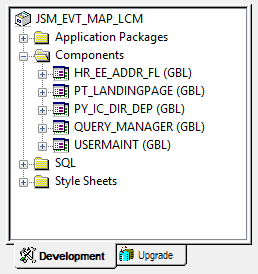
    Inserting a row into the left-hand navigation required RowInit PeopleCode. Clicking a link in the left-hand navigation invokes FieldChange. Changing the title and adding icons involved PageActivate PeopleCode. These are 3 distinct events at 3 different levels. I added the Personal Details Addresses component as well as several other Event Mapping configurations to a project. The following is a screenshot of that project:

    When I run this SQL, I see the following output:

    In the SQL results, did you see the EOCC_POSTBUILD Service ID? That is event mapping inserted by Page Field Configurator. Page Field Configurator is a tool on top of Event Mapping, and therefore suffers from the same LCM concerns.

    Do you want to learn more about Event Mapping? Event Mapping is a PeopleTools 8.55 new feature that is extended in PeopleTools 8.56. At JSMPROS, we regularly lead PeopleTools delta courses covering new features, including Event Mapping. Visit us at jsmpros.com/training-live-virtual to find a course that fits your schedule.

    P.S. I will be sharing this example and many more in an HIUG webinar on February 16, 2018. If you are a member of the Healthcare Industry User Group, you won't want to miss this webinar!

    Friday, December 22, 2017

    Weekend Fluid Classes

    Habit 7: Sharpen the saw. We all know we must sharpen our mental saw. The challenge is fitting saw sharpening into our schedule. If you are a billable consultant dedicated to a project, then you are often bound by contract to be onsite during regular business hours. If you find yourself in this situation, sharpening your technical skills can be challenging because most training courses happen during your committed working hours. We understand the struggle and want to do what we can to help. With that in mind, we are offering our popular Fluid training series over two consultant weekends (Friday and Saturday) of January:

    • Fluid 1: Jan 12-13, 2018
    • Fluid 2: Jan 26-27, 2018

    Further details and registration information are available on our website

    Wednesday, December 20, 2017

    Using CSS Frameworks with PeopleSoft Fluid

    Fluid is Oracle's strategic direction. If you have experience with Fluid development, you know that dragging, dropping, and aligning fields on a canvas isn't enough to develop a multi-form factor Fluid user interface. With Fluid comes an emphasis on CSS3 for multi-form factor support. This means you must add CSS class names to page fields to support different screen sizes. PeopleTools comes with an extensive list of predefined CSS class names. The challenge is identifying which CSS class to use. Fortunately, Oracle published two extremely helpful documents:

    If you learn the style classes in these two documents, you will do quite well with Fluid layout (actually, just learn a few dozen of these classes and you will do quite well). But what if you want to use features of CSS that don't exist in Fluid-delivered CSS classes? Flexbox, for example, is one of the most powerful features of CSS3. When I find myself terribly annoyed with Fluid layout, I throw a Flexbox at my layout issue and the problem is solved. If we want to apply styling using CSS attributes that PeopleSoft hasn't already defined, we have two options:

    • Define our own CSS classes by creating a free-formed stylesheet or
    • Borrow someone else's CSS class names from a CSS framework.

    Writing your own CSS can be a rewarding experience. I can often solve layout problems with just a few lines of CSS. My concern, however, is maintenance. What starts as a one-time CSS "fix" (or hack) for a layout often turns into a copy/paste exercise replicated at least a dozen times, with each page using some of the same CSS and some different CSS. Then what? Do we create a separate CSS file for each Fluid page? Do we refactor common CSS, moving similar code into a shared library?

    Given the age and history of the internet, most web layout problems have already been solved. Since PeopleSoft is just another web application, we can leverage the work of the world wide web's pioneers. The solutions to most of our layout problems exist in today's common CSS frameworks, Boostrap being the most popular. There are many PeopleSoft consultants happily using Bootstrap to enhance PeopleSoft Fluid pages. Here is how they do it:

    1. Import Bootstrap into a Freeform Stylesheet
    2. Use AddStylesheet to insert Bootstrap into a Peoplesoft page
    3. Apply Bootstrap style classes to Fluid page elements
    4. Create a "reset stylesheet" to fix everything Bootstrap broke.

    Yes, you read that last line correctly, "... fix everything Bootstrap broke." Please don't misread this. There are many developers successfully using Bootstrap with PeopleSoft. But here is the problem: Most CSS frameworks directly style HTML elements. This is actually good. Developers call this a "reset" stylesheet. What makes this a problem for PeopleSoft is that PeopleTools ALSO applies CSS directly to HTML elements. PeopleTools includes its own reset stylesheet. In a sense, we could say that Fluid is a CSS framework itself. The end result is a mixture of styles applied to HTML elements by two competing and complementing CSS frameworks. I call this "Fluid-strap." Consultants work around this problem by creating a reset for the competing reset stylesheets — a reset for the reset.

    Here is another alternative: Use a CSS framework that does NOT style HTML elements, but instead relies on class names. This type of CSS framework was designed for compatibility. This type of framework understands that another CSS framework is in charge. My personal favorite CSS compatibility library is Oracle JET. In Oracle JET's GitHub repository, you will find oj-alta-notag.css, a CSS file containing a lot of CSS class names and no element declarations. To use this library, follow the first three steps described above, skipping the final step:

    1. Import oj-alta-notag.css into a Freeform Stylesheet
    2. Use AddStylesheet to insert the Oracle JET Stylesheet into a Peoplesoft page
    3. Apply Oracle JET style classes to Fluid page elements

    The key difference is we don't have to create a reset for the reset. The Oracle JET stylesheet silently loads into a PeopleSoft page without changing any styling unless specifically asked to style an element through the element's Default Style Name (Style Classes on 8.56) property.

    Consider a PeopleSoft page built with 4 group boxes aligned horizontally as demonstrated in the following screenshot.

    In Classic, what you see is mostly what you get, so the online rendering would look nearly the same as the Application Designer screenshot. In Fluid when viewed online, however, each group box will render vertically as follows:

    We can fix this by applying a CSS Flexbox to the 4 group boxes. With Flexbox, the 4 group boxes will align horizontally as long as the device has enough horizontal real estate. If the display is too small, any group boxes that don't fit horizontally will move to the next row. For this example, we will use Oracle Jet's Flex Layout.Here are the steps

    1. Add a Layout only Group Box around the 4 horizontal group boxes and mark the container group box as Layout Only
    2. While still setting container group box properties, set the group box's style class to oj-flex oj-sm-flex-items-1
    3. Likewise, to each of the 4 horizontal group boxes, add the Style Class oj-flex-item
    4. Create a Freeform stylesheet definition containing oj-alta-notag-min.css
    5. Use the AddStylesheet PeopleCode function in PageActivate to insert the Stylesheet into your page

    The end result will look something like this:

    Several years ago, I read the book Test Driven Development by Kent Beck. In that book, Kent identifies the first step of each project as the hardest step. Why? Because each new project contains significant uncertainty. Software development seems to involve a lot of unknowns (if the solution was known, someone would have created it, automated it, and published it). His advice? Start with what you know. You start with what you know and work torwards what you don't know. This is how we teach Fluid at JSMPros. Your developers understand Classic development and we use that knowledge to springboard students into a higher level of Fluid understanding. If you are ready to take the Fluid challenge, I encourage you to register for one of our monthly Fluid classes at www.jsmpros.com/training-live-virtual. Have a group of eight or more developers? Contact us to schedule your own personalized Fluid training event.

    Monday, December 18, 2017

    Is Your Fluid Custom Action Menu Page-based or Component-based?

    In the upper right corner of the Fluid header you will find the "Hamburger" (or hamburger-light) menu. This 3-bar (or 3-dot) icon displays a list of component-specific actions. For the most part these actions are rather generic, allowing a user to add a tile to a homepage or view preferences. Occassionaly we see a component that has its own custom actions. The HCM My Team and Company Directory components are great examples of components with custom action menu items. In fact, the Fluid homepage itself is an example, with its Personalize Homepage custom action.

    As developers, we can add custom component-specific actions to the header menu of a component by adding a special group box (Custom Action Menu) to one of the component's pages. When PeopleSoft loads a page with a Custom Action Menu group box, it moves the contents of that group box into the header action menu. Any actions loaded from a page stay resident in the menu as long as the component is in scope. So, technically, all Custom Action Menus are component-based. Here is my struggle:

    Actions inserted into the header menu have component scope, not page scope, but are defined at the page level.

    Custom action menu items are not visible (in fact, don't exist) until the page defining these menu items is loaded into the user's browser. If a component may have multiple pages, into which page would you insert the custom action menu? Logically, I might say, "The first page, of course." But here is the problem: there really is no "first page." There is a page that the component will load by default. We might call that the front door. PeopleSoft, however, lets users enter through the side door, back door, and all windows as well. By adding ?Page=... to a component URL, I can enter that component from any page within the component. For example, if I want to open the User Profile component to the User Queries page, I add PAGE=USER_QUERY to the end of the URL. If I enter a component through the wrong starting page, then I won't see the component's custom actions in my header menu.

    You don't think your users will enter a page name in the URL? Probably not. Why worry about a scenario that will never happen? Actually, it isn't my users that concern me. It is system generated messages and processes with URLs. It is workflow notifications that attempt to simplify workflow by taking me to the next step in a business process.

    If a user can enter a component through any page and component specific actions must be defined on a page, then into which page should I enter component-specific actions? While teaching a Fluid class and challenging students to find a solution to this problem, one of my students asked me, "What if you put the menu definition in a Footer page?" Wow! What a great idea! If you have component-scoped actions, why not define them in a component-scoped page? This page will load as soon as the component loads, regardless of the entry point. If you already have a footer page in your component, perfect! Just add the Custom Action Menu group box to your existing footer page. If you don't have a footer page, should you add one? I say, "Yes." Properly built, a footer page may be entirely invisible, used just for component-specific banner (also known as the header) changes (including Custom header left, right, and bottom sections). Seems ironic doesn't it? If you want to change the header, add content to the footer. Here is a sample footer page built specifically to hold a menu. By clearing the CSS class name from the outer container Group Box, the footer becomes invisible.

    The following screenshot shows how the menu will appear when PeopleSoft reparents the menu's HTML from the footer into the header component action menu.

    Interested in learning more about Fluid? I offer at least one virtual Fluid training class per month. You can learn more about our current offerings on our Live Virtual Training page. If your organization has more than 8 employees, you may derive cost savings by hosting your own training event. Learn more at www.jsmpros.com/training.

    Follow my blog with Bloglovin

    Wednesday, November 01, 2017

    November/December Online Class Offerings Posted

    We posted our online class offerings for November and December, 2017. You can find details on our website. Our Fluid classes have been extremely popular, so we will continue offering those at least once per month. Our Fluid 1 class is designed to get a developer up and running with Fluid as fast as possible. Through hands-on activities, you will use familiar tools and existsing skills to build Fluid components. No web development experience necessary. If you are a PeopleSoft developer, then Fluid 1 will teach you what you need to know to build Fluid pages. But there is more to Fluid than just dragging and dropping fields on a page. Fluid 2 takes your Fluid game to the next level by teaching you Fluid design patterns and Fluid techniques to build Fluid pages the way Oracle builds Fluid pages.

    November, 2017

    Course Title Date Start Time End Time Duration  
    AWE Nov. 7, 2017 9:00 AM PDT 4:00 PM PDT 2 days Register
    Fluid 1 Nov. 27, 2017 9:00 AM PDT 4:00 PM PDT 2 days Register
    Fluid 2 Nov. 29, 2017 9:00 AM PDT 4:00 PM PDT 2 days Register


    December, 2017

    Course Title Date Start Time End Time Duration  
    Fluid 1 December 11, 2017 9:00 AM PDT 4:00 PM PDT 2 days Register
    Fluid 2 December 13, 2017 9:00 AM PDT 4:00 PM PDT 2 days Register
    PeopleTools
    8.55/8.56 Delta
    December 19, 2017 9:00 AM PDT 4:00 PM PDT 2 days Register

    Thursday, October 12, 2017

    Identifying Conditional Navigation Content References

    As PeopleSoft customers upgrade to Fluid-enabled applications, it is quite common to start with Fluid disabled, and then implement Fluid behavior post go-live. It is all about change management and an organization's ability to digest change. Even though Oracle has set retirement dates for certain Classic components, with the first wave retiring December 31, 2017, all Classic functionality is still supposed to be present and available. But if you have opened a recent PeopleSoft image or are in the middle of updating to a recent HCM build, you may be asking, "Where are those delivered and supported Classic components?" If you investigate the portal registry, you will see they exist, they just don't appear in any menus. Many of these menu items, such as the Personal Details menu items, use a feature named Conditional Navigation. PeopleSoft uses Conditional Navigation to conditionally replace Classic menu items with their Fluid counterparts. You can read more about Conditional Navigation in PeopleBooks at PeopleTools PeopleBooks entry Products > Development Tools > Portal Technology > Understanding Conditional Navigation. A question I hear regularly is, "How do I temporarily enable Classic components in my PeopleTools 8.55+ environment?" The first step is to disable Conditional Navigation and the MyOracle Support document 2215964.1 describes how. Armed with this information, you now know what it is, how to configure it, and how to disable it, but how do you find it? I mean, what components are preconfigured for conditional navigation? Since conditional navigation uses CREF attributes, CREF identification requires a small SQL statement:

    That is nice, but the portal registry isn't structured that way. Next question: How do I find those CREFs in the portal registry? Here is the longer form SQL statement. Results contain complete paths to conditionally configured items. Those of you that follow my blog may recognize this SQL as a derivative of Query for Component and/or CREF Navigation Take II

    Wednesday, October 04, 2017

    October Fluid Training

    Last month I announced two new training courses: Fluid 1 and Fluid 2. We ran these courses at the end of September. For those of you that weren't able to attend the September session, we scheduled another series for October:

    Both sessions run for 2 days from 9 AM Pacific until 4 PM Pacific. The first course, Fluid 1, is a course designed for developers, architects, designers, and system analysts, and focuses on the basics of Fluid development. The point is to make students productive as fast as possible. Through hands-on activities, students will learn the basics of Fluid development including Fluid user interface configurations and best practices for page development. There is no extra fluff in this course. Students will learn how to build Fluid pages without having to become web development experts.

    The second course, Fluid 2, teaches developers the techniques used by Oracle and modern web developers to build both responsive and adaptive user experiences through Fluid. This course is definitely level 2. Students will learn advanced topics such as how to use modern CSS frameworks for responsive design and how to create dynamic tiles for intelligent homepages.

    Prerequisites? Experience. The entry requirements for Fluid 1 are intentionally low. The first half, day one, will be in the browser. No PeopleTools experience is required to use a browser. System analysts will benefit greatly from this half of the course. The second half, day two, is exclusively in Application Designer. In day two, students will build Fluid pages using Application Designer. Experience building Classic pages, records, and components is required. I have found there are a lot of non-developers with experience building and examining Classic pages, records, and components. That qualifies.

    Students attending Fluid 2 are expected to have experience building Classic and Fluid pages in PeopleTools as well as experience working with Records, Fields, and PeopleCode.

    Normally PeopleTools 1, PeopleTools 2, and PeopleCode would be prerequisites for learning Fluid. This is true. Anyone learning Fluid should have this experience. But often I find that people with relevant experience avoid registering for courses because they haven’t checked a specific training requirement box. Do not discount your on the job training experience.

    Are you interested in hosting on-site training for your organization? For more information on these or other courses, please feel free to send a request to info@jsmpros.com.

    Here are the full course abstracts:

    Fluid 1

    Technology Overview
    • Why Fluid? Learn the history and purpose of Fluid
    Hands on: Reviewing elements of Fluid
    • Fluid banner
    • Navigation bar
    • Fluid homepages (also known as Landing pages)
    • Tiles
    • Transaction pages
    Working with Fluid Homepages and Dashboards
    • Understanding Fluid homepages
    • Hands on: Personalizing Fluid homepages
    • Hands on: Creating and managing personal and public Fluid homepages
    • Hands on: Managing Fluid system settings
    • Hands on: Creating and managing Fluid dashboards
    • Understanding the role of the Portal Registry in Fluid homepages
    Working with Tiles and Tile Wizard
    • Understanding Tiles and the Tile Repository
    • Hands on: Creating tiles
    • Hands on: Managing Fluid Attributes of Content References
    • Hands on: Creating tiles with the Tile Wizard
    • Understanding the role of the Portal Registry in Fluid tiles
    Creating Fluid Pages
    • Understand the differences between Classic and Fluid
    • Learn key design concepts such as Phone-first, Responsive, and Adaptive design and how they relate to Fluid
    • Hands on: Creating Fluid page definitions (standard and two-column)
    • Hands on: Using page and field Fluid-specific attributes
    Working with Fluid Components
    • Understanding Fluid components
    • Hands on: Creating Fluid components
    • Hands on: Configuring Fluid Content References
    Working with Search Pages
    • Understand Fluid search options
    • Hands on: Implement real-time Component search through Pivot Grids
    • Hands on: Implement real-time Component search through custom search Pages
    • Hands on: Implement keyword Component search through the Search Framework

    Fluid 2

    Advanced Fluid Page Design
    • Understand the role of CSS in Fluid and responsive design
    • Hands on: Working with different Fluid page types
    • Hands on: Using Oracle-delivered Fluid CSS classes
    • Understanding CSS Flexbox
    • Hands on: Creating custom CSS classes
    • Hands on: Using CSS frameworks
    • Hands on: Using Fluid adaptive design with subpages
    Using PeopleCode in Fluid Applications
    • Learn about and use Fluid-specific PeopleCode functions, design patterns, and best practices
    Advanced Tiles and Tile Wizard
    • Hands on: Creating static and dynamic tiles using a variety of technologies
    • Hands on: Dynamic tiles and the Tile Wizard
    Understanding Fluid Definitions and Metadata
    • Understand delivered Fluid managed definitions, the building blocks of Fluid
    • Understand Fluid metadata such as Tile Wizard metadata
    Event Mapping in Fluid
    • Hands on: Learn how to extend delivered Fluid components without changing Oracle’s code

    Thursday, September 07, 2017

    New Fluid Training Classes, Live and Virtual

    On December 31, 2017, just a couple of months from now, Oracle will decommission the first set of Classic pages to be fully replaced by Fluid. Support document 1348959.1 contains a list of Classic pages, sorted by date, that are slated for retirement every year over the next few years. Customers interested in retaining a supported PeopleSoft implementation should familiarize themselves with this document and prepare to implement Fluid. This document contains important Manager and Employee self-service features that will no longer be supported in Classic form. Is your team trained and ready to adopt Fluid?

    During my tenure at GreyHeller, I had the opportunity to lead several customer-specific Fluid workshops. The purpose of these workshops is to give customers hands-on experience with Fluid. These workshops are a starting point, a Fluid experience. As humans, we are often afraid of the unknown and these workshops provide practical, real-world experience.

    I have expanded these workshops into a multi-day two-part series and am offering them in two formats:

    • Remote, but live virtual classes (LVC) hosted by GoToTraining or
    • By request on-site live instructor-led training.

    Both courses (and formats) are two full days. The first course, Fluid 1, is a course designed for developers, architects, designers, and system analysts, and focuses on the basics of Fluid development. The point is to make students productive as fast as possible. Through hands-on activities, students will learn the basics of Fluid development including Fluid user interface configurations and best practices for page development. There is no extra fluff in this course. Students will learn how to build Fluid pages without having to become web development experts.

    The second course, Fluid 2, teaches developers the techniques used by Oracle and modern web developers to build both responsive and adaptive user experiences through Fluid. This course is definitely level 2. Students will learn advanced topics such as how to use modern CSS frameworks for responsive design and how to create dynamic tiles for intelligent homepages.

    Prerequisites? Experience. The entry requirements for Fluid 1 are intentionally low. The first half, day one, will be in the browser. No PeopleTools experience is required to use a browser. System analysts will benefit greatly from this half of the course. The second half, day two, is exclusively in Application Designer. In day two, students will build Fluid pages using Application Designer. Experience building Classic pages, records, and components is required. I have found there are a lot of non-developers with experience building and examining Classic pages, records, and components. That qualifies.

    Students attending Fluid 2 are expected to have experience building Classic and Fluid pages in PeopleTools as well as experience working with Records, Fields, and PeopleCode.

    Normally PeopleTools 1, PeopleTools 2, and PeopleCode would be prerequisites for learning Fluid. This is true. Anyone learning Fluid should have this experience. But often I find that people with relevant experience avoid registering for courses because they haven’t checked a specific training requirement box. Do not discount your on the job training experience.

    I have scheduled two multi-day events and I encourage you to register as soon as possible. To ensure a quality experience, class size is limited. There has never been a more important time to learn Fluid!

    Are you interested in hosting on-site training for your organization? For more information on these or other courses, please feel free to send a request to info@jsmpros.com.

    Here are the full course abstracts:

    Fluid 1

    Technology Overview
    • Why Fluid? Learn the history and purpose of Fluid
    Hands on: Reviewing elements of Fluid
    • Fluid banner
    • Navigation bar
    • Fluid homepages (also known as Landing pages)
    • Tiles
    • Transaction pages
    Working with Fluid Homepages and Dashboards
    • Understanding Fluid homepages
    • Hands on: Personalizing Fluid homepages
    • Hands on: Creating and managing personal and public Fluid homepages
    • Hands on: Managing Fluid system settings
    • Hands on: Creating and managing Fluid dashboards
    • Understanding the role of the Portal Registry in Fluid homepages
    Working with Tiles and Tile Wizard
    • Understanding Tiles and the Tile Repository
    • Hands on: Creating tiles
    • Hands on: Managing Fluid Attributes of Content References
    • Hands on: Creating tiles with the Tile Wizard
    • Understanding the role of the Portal Registry in Fluid tiles
    Creating Fluid Pages
    • Understand the differences between Classic and Fluid
    • Learn key design concepts such as Phone-first, Responsive, and Adaptive design and how they relate to Fluid
    • Hands on: Creating Fluid page definitions (standard and two-column)
    • Hands on: Using page and field Fluid-specific attributes
    Working with Fluid Components
    • Understanding Fluid components
    • Hands on: Creating Fluid components
    • Hands on: Configuring Fluid Content References
    Working with Search Pages
    • Understand Fluid search options
    • Hands on: Implement real-time Component search through Pivot Grids
    • Hands on: Implement real-time Component search through custom search Pages
    • Hands on: Implement keyword Component search through the Search Framework

    Fluid 2

    Advanced Fluid Page Design
    • Understand the role of CSS in Fluid and responsive design
    • Hands on: Working with different Fluid page types
    • Hands on: Using Oracle-delivered Fluid CSS classes
    • Understanding CSS Flexbox
    • Hands on: Creating custom CSS classes
    • Hands on: Using CSS frameworks
    • Hands on: Using Fluid adaptive design with subpages
    Using PeopleCode in Fluid Applications
    • Learn about and use Fluid-specific PeopleCode functions, design patterns, and best practices
    Advanced Tiles and Tile Wizard
    • Hands on: Creating static and dynamic tiles using a variety of technologies
    • Hands on: Dynamic tiles and the Tile Wizard
    Understanding Fluid Definitions and Metadata
    • Understand delivered Fluid managed definitions, the building blocks of Fluid
    • Understand Fluid metadata such as Tile Wizard metadata
    Event Mapping in Fluid
    • Hands on: Learn how to extend delivered Fluid components without changing Oracle’s code